



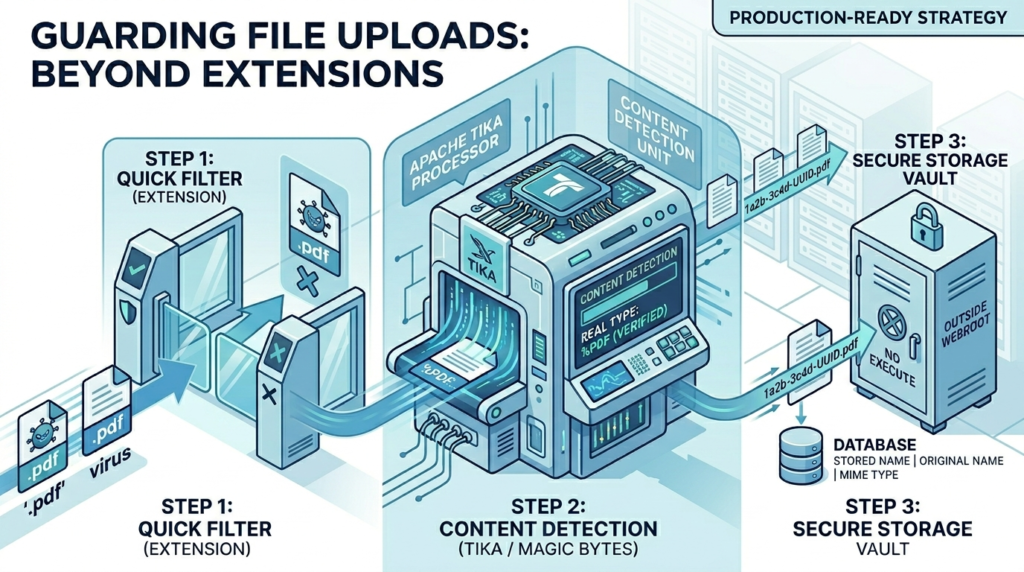
TL;DR
- File extension and browser-provided MIME type can both be faked: never rely on them alone.
- Use Apache Tika (or magic bytes) to detect the real file type from content.
- Always combine: extension check + content-based detection + size limit.
- Rename uploaded files with UUID, store outside webroot, and disable execute permissions.
The Day I Thought I Was Safe
A few months into my first production project, I added file upload. Users could submit a PDF report. My validation looked like this:
FileUploadController.java (naïve version)
javaif (!file.getOriginalFilename().endsWith(".pdf")) {throw new IllegalArgumentException("Only PDFs allowed!");}
Looked fine to me. We shipped it. A few weeks later, a senior dev on the team pinged me: “Bhai, rename any .php file to .pdf and upload it. See what happens.”
I tried it. It uploaded. Successfully. That file could have been executed if the server were misconfigured. That was my introduction to why file upload security is not just a checkbox.
This guide is what I wish I had back then.
The Two Mistakes Almost Everyone Makes
Mistake 1: Trusting the file extension
A file extension is just part of a filename string. The OS uses it as a hint — nothing more. Any user can rename malware.php to report.pdf before uploading. Your check passes. Their file is in.
Mistake 2: Trusting getContentType()
When a browser uploads a file, it sends a Content-Type header like application/pdf. Spring exposes this via MultipartFile.getContentType(). But here’s the thing:
The browser gets the content type from the file extension. It doesn’t open the file and inspect it. So a renamed PHP file will have its content type reported as application/pdf. And with tools like Postman or curl, an attacker can set any content type they want.
Both of these checks are easy to pass without actually having the right file type.
Think of it this way: checking the extension is like judging a person’s job by what their name tag says. Checking the browser’s content type is like believing it because they typed it themselves on the name tag. Neither tells you if they actually work there.
What Spoofing Actually Looks Like
A spoofed upload is simpler than it sounds. Here’s all it takes from an attacker’s side:
Terminal — curl-based spoof uploadbash# Attacker uploads a PHP file disguised as a PDFcurl -X POST https://yourapp.com/upload \-F "file=@shell.php;filename=invoice.pdf;type=application/pdf"
The filename says .pdf. The content type says application/pdf. But the actual content is PHP code. If your server only checks those two things, this gets through.
The Production-Ready Approach
Here’s a layered strategy. Think of it like security checkpoints — the more layers, the harder it is to sneak through.
- Extension Check: Quick allowlist filter: reject obvious nonsense early
- Size limit: Block resource abuse and DoS attempts
- Content Detection: Read actual file bytes: the real security check
- Rename + Store Safely: UUID name, outside webroot, no execute permission
First: Configure size limits in Spring
application.ymlyaml
spring:servlet:multipart:max-file-size: 10MBmax-request-size: 12MB
The main validator service
// FileValidationService.javajava@Servicepublic class FileValidationService {// Step 1: Allowlist of permitted extensionsprivate static final Set<String> ALLOWED_EXTENSIONS =Set.of("pdf", "jpg", "jpeg", "png");// Step 2: Allowlist of permitted detected MIME typesprivate static final Set<String> ALLOWED_MIME_TYPES =Set.of("application/pdf", "image/jpeg", "image/png");private final Tika tika = new Tika();public void validate(MultipartFile file) {if (file.isEmpty()) {throw new ValidationException("File is empty");}// Extract and check extensionString originalName = file.getOriginalFilename();String ext = getExtension(originalName).toLowerCase();if (!ALLOWED_EXTENSIONS.contains(ext)) {throw new ValidationException("File type not allowed: " + ext);}// Content-based detection via Tika (reads actual bytes)try {String detectedMime = tika.detect(file.getInputStream());if (!ALLOWED_MIME_TYPES.contains(detectedMime)) {throw new ValidationException("File content mismatch. Detected: " + detectedMime);}} catch (IOException e) {throw new ValidationException("Could not read file content");}}private String getExtension(String filename) {if (filename == null || !filename.contains(".")) {return "";}return filename.substring(filename.lastIndexOf(".") + 1);}}
Note: tika.detect(InputStream) reads the first few bytes of the file (called “magic bytes”) to figure out its real type. This is what the browser doesn’t do, but Tika does. This is the key check.
The Maven dependency for Tika
// pom.xml<dependency><groupId>org.apache.tika</groupId><artifactId>tika-core</artifactId><version>2.9.1</version></dependency>
Note: Use tika-core, not tika-parsers. The core library is lightweight (a few hundred KB) and handles detection well. The full parsers bundle is ~100MB : way too heavy for this use case.
Safe file storage service
//FileStorageService.javajava@Servicepublic class FileStorageService {// Store outside the webroot — not under src/main/resources/staticprivate final Path storageDir = Paths.get("/var/app/uploads");public String store(MultipartFile file, String originalName) {// Generate a UUID-based filename — never trust user-provided namesString ext = getExtension(originalName);String storedName = UUID.randomUUID() + "." + ext;Path destination = storageDir.resolve(storedName);try (var inputStream = file.getInputStream()) {// Stream copy — avoids loading entire file into memoryFiles.copy(inputStream, destination,StandardCopyOption.REPLACE_EXISTING);// Disable execute permissions (Linux/Mac)destination.toFile().setExecutable(false, false);} catch (IOException e) {throw new StorageException("Failed to store file", e);}return storedName; // Save this to your DB, not the original name}}
Do You Actually Need Apache Tika?
Tika is the most reliable option for production, but let’s be honest about tradeoffs.
| Situation | Recommendation |
| Financial, healthcare, or compliance-heavy app | Use Tika |
| Internal tool with trusted users | Extension check may be enough |
| High-traffic API, lots of uploads per second | Tika is fine, detection is fast |
| Need to detect 100+ file types precisely | Use Tika |
| Tiny microservice, need minimal deps | Magic bytes manually (see below) |
Lightweight alternative: magic bytes manually
Every file format has a known “signature” in its first few bytes. For example, a real PDF starts with the bytes 25 50 44 46 (which is %PDF in ASCII). You can check this without any library:
// MagicBytesUtil.javajavapublic static boolean isPdf(InputStream input) throws IOException {byte[] header = input.readNBytes(4);// PDF magic bytes: %PDFreturn header.length == 4&& header[0] == 0x25 // %&& header[1] == 0x50 // P&& header[2] == 0x44 // D&& header[3] == 0x46; // F}
Caution: Magic bytes work well for common formats (PDF, PNG, JPEG, ZIP). But if you support many file types, maintaining your own magic byte lookup gets messy fast. Tika covers all of this for you.
Performance-wise: Tika detection reads just the first few hundred bytes. For most uploads, it adds under 5ms. Unless you’re processing thousands per second, it won’t be your bottleneck.
Best Practices from Real Systems
1. Always stream the file — never read it all into memory
Use file.getInputStream(), not file.getBytes(). A user uploading a 500MB file with getBytes() will put 500MB in your JVM heap. Do this with 10 concurrent users and you’re looking at an OOM crash. Streams avoid this entirely.
2. Rename every file to a UUID
Never store the original filename from the user. Filenames can contain path traversal sequences like ../../etc/passwd. A UUID filename is safe, unique, and gives you no attack surface. Store the original filename in your database for display purposes.
3. Store metadata in the database
// FileMetadata.java (JPA entity sketch)@Entitypublic class FileMetadata {private String storedName; // UUID-based, used on diskprivate String originalName; // From user, stored but never used as pathprivate String detectedMimeType; // From Tika, not from browserprivate Long sizeInBytes;private Long uploadedBy; // User IDprivate LocalDateTime uploadedAt;}
4. Store files outside the webroot
If you store uploads inside your static resources folder, someone who finds the filename can access the file directly via URL. Store them at a path like /var/app/uploads/ and serve them through a controller that checks authentication first.
5. Disable execute permissions on Linux
Call file.setExecutable(false, false) after saving. This ensures that even if a malicious file sneaks through somehow, the OS won’t run it as an executable.
6. Optional: virus scanning for high-risk applications
If your users upload files that others will download (document sharing, job portals, etc.), consider integrating ClamAV via the clamav4j library. It’s free, open source, and can scan files before they’re stored. Overkill for most internal tools, but worth it for platforms with public-facing file sharing.
Here’s your content cleanly formatted as a table:
| Check | Can be faked? | Use it? | Why |
getOriginalFilename() extension |
Yes, easily | As pre-filter | Rejects obviously wrong types fast, before hitting Tika |
getContentType() from browser |
Yes, trivially | Don’t rely on it | Attacker-controlled. Log it, don’t trust it |
| Tika / magic bytes detection | Very hard | Yes, required | Reads actual file content — the source of truth |
| Extension matches detected type | No | Yes, add this check | Cross-validate: extension + Tika result must agree |
Bonus:
Here I am giving the open disucssion that we have done on Reddit: https://www.reddit.com/r/SpringBoot/comments/1sahvs1/comment/oe17vbj/
