



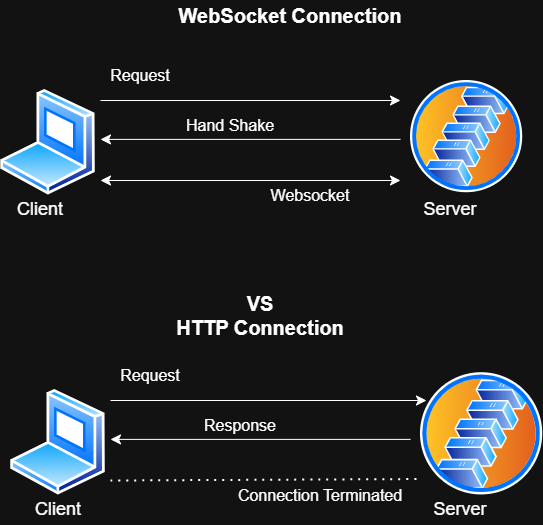
Normal HTTP works like this:
You (the browser) ask the server for something → server replies → connection closes.
Great for loading a webpage or submitting a form, but terrible for real-time.
If you want live updates, you’d have to keep asking (“poll”) the server every few seconds. That’s wasteful, lots of unnecessary requests, delays, and extra work.
WebSocket fixes that.
What is WebSocket?
WebSocket is the core technology; it’s not exclusive to Spring Boot; it’s a standard protocol outlined by the IETF (Internet Engineering Task Force) in RFC 6455. Spring Boot makes it easier to implement on the backend.
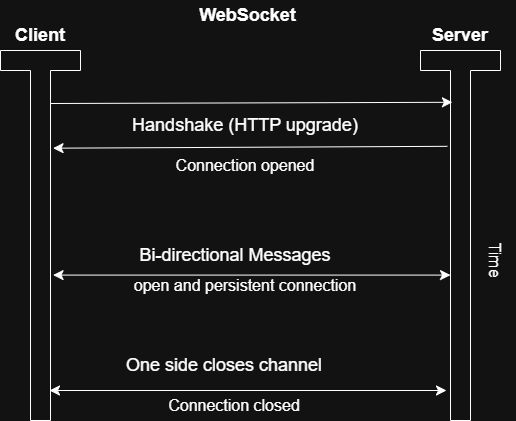
Definition: WebSocket is a communication protocol that creates a persistent, full-duplex (two-way) connection over a single TCP (Transmission Control Protocol) socket. It starts with an HTTP handshake (a special upgrade request) but then switches to a long-lived connection where data can flow freely in both directions.
Simple Analogy:
HTTP is like sending emails back and forth: you write one, send it, wait for a reply, repeat.
WebSocket is like being on a phone call: once you’re connected, you can just talk whenever you want without hanging up and calling again.
Here’s a clear diagram showing how the connection works:
Key Components:
- Handshake: The client sends an HTTP request with an “Upgrade: websocket” header. If the server agrees, it responds with a 101 status code, and the connection upgrades.
- Frames: Data is sent in small “frames” (like packets) that can carry text, binary data, or control signals (e.g., ping/pong for keeping the connection alive).
- Stateful Nature: Unlike stateless HTTP, WebSocket remembers the connection, allowing the server to push updates instantly.
Applications: Where and Why it’s Used
WebSocket shines in scenarios needing real-time, bidirectional updates. Reasons: It reduces latency and overhead compared to alternatives like long-polling or Server Sent Event(SSE). Common Use Cases:
- Chat Applications: Real-time messaging (e.g., Slack or WhatsApp web—messages appear instantly without refreshing).
- Live Notifications: Stock prices, sports scores, or social media feeds (e.g., Twitter live updates).
- Collaborative Tools: Google Docs-like editing where changes sync in real-time.
- Online Gaming: Multiplayer actions (e.g., moving a character) need instant server-client sync.
- IoT Dashboards: Devices sending sensor data to a web app for live monitoring.
Pros of WebSocket
- Low latency: Messages are sent instantly without waiting for the client to ask. This happens because the connection stays open, so there’s no need to create a new HTTP connection every time.
- Efficient: Once connected, only the actual message data is sent. There are no repeated HTTP headers or constant polling, which saves bandwidth.
- Two-way communication: The server can send messages to the client anytime. This makes real-time features like chat notifications or live updates possible without refreshing the page.
- Supports binary data: WebSocket can send not only text, but also images, videos, or game data efficiently.
- Widely supported: It works in all modern browsers and is a global standard, so it’s reliable and compatible across platforms.
Cons of WebSocket
- Stateful connections: Each open connection uses server resources like memory and threads. With many users, this can affect scalability, so load balancing or clustering is often needed.
- Network restrictions: Some proxies or corporate firewalls may block WebSocket connections. Using
wss://or alternatives like Server-Sent Events (SSE) can help. - More complex error handling: Connections can drop due to network issues, so you must handle reconnections, heartbeats, and failures manually.
- Security concerns: Open connections can be abused if not secured properly. Authentication (like JWT or sessions) should be done during the handshake.
- Not always necessary: If you only need one-way updates from server to client, simpler options like SSE may be a better choice.
STOMP: Overview
- STOMP(Simple Text Oriented Messaging Protocol) is a higher-level protocol that often runs on top of WebSocket. It’s not mandatory – you can use raw WebSocket – but it’s super useful for structured messaging. In simple terms, it is a light-weight, text-based protocol for sending and receiving messages over a transport like WebSocket. It adds structure to a WebSocket’s raw data stream, using commands (e.g., SEND, SUBSCRIBE), headers (key-value pairs), and bodies (the actual message).
- Easier Analogy: WebSocket is like a raw telephone wire— it connects you but doesn’t define how to speak. STOMP is like adding a simple language (e.g., “Hello, subscribe to topic X”) so both sides understand the conversation. It’s “simple” because it’s human-readable and easy to parse.
Key Components: Commands: Basic verbs like connect (start session), SEND (send message), SUBSCRIBE(listen to a topic) and ACK (acknowledge receipt). Destination: Messages are routed to “topics” (broadcast to many) or “queues” (point-to-point) Broker Model: Often used with a message broker (e.g. in Spring Boot, an in-memory broker, or external like RabbitMQ, Redis Streams, Kafka ) that handles routing and subscriptions. Relationship to WebSocket: STOMP isn’t tied to WebSocket- it can run over TCP or other transports – but it’s commonly layered on WebSocket for web apps. WebSocket provides the pipe; STOMP provides the messaging rules.
Applications: Where and Why it’s Used?
STOMP i ideal for pub-sub patterns in real-time systems. It abstracts away low-level details, making it easier to build scalable, multi-client apps. Common Use Cases: Real-Time chat with Groups: Users subscribe to chat rooms (topics) and send messages via STOMP. Broadcast Notifications: E.g. a stock trading app where users subscribe to price updates. Event-Driven Systems: Microservices communicating live events (e.g., order updates in e-commerce). Integration with Brokers: Pair with tools like RabbitMQ for reliable messaging.
Pros:
- Simplicity and Readability: Text-based, so easy to debug (e.g., log messages). Reason: Commands like “SEND destination:/topic/chat” are intuitive, reducing development time.
- Structured Messaging: Adds headers, acknowledgments, and transactions. Reason: This enables features like reliable delivery (e.g., ACK ensures messages aren’t lost) and routing (e.g., to specific users).
- Interoperability: Works with many languages and brokers. Reason: It’s a standard protocol, so your Java Spring Boot backend can talk to JavaScript clients seamlessly.
- Pub-Sub Support: Easy broadcasting. Reason: Clients subscribe once and receive updates automatically, perfect for scalable real-time apps.
- Extensibility: Custom headers for metadata (e.g., user ID). Reason: Enhances security and context without reinventing the wheel.
Cons:
- Overhead: Adds protocol layers (headers, parsing). Reason: For very high-performance needs (e.g., ultra-low-latency gaming), raw WebSocket is lighter—STOMP’s text format can increase payload size by 10-20%.
- Limited to Text: Primarily text-oriented; binary data needs encoding (e.g., Base64). Reason: This can complicate apps dealing with images or files.
- Dependency on Broker: Often requires a message broker for full features. Reason: Without one, you handle routing manually, adding complexity. In Spring Boot, the built-in simple broker is fine for small apps but scales poorly.
- Learning Curve: If you’re new, understanding commands takes time. Reason: It’s simpler than AMQP or JMS, but still more than raw WebSocket for basic use cases.
- Not for All Real-Time Needs: For simple one-way pushes, raw WebSocket or SSE might suffice. Reason: STOMP’s structure is overkill if you don’t need subscriptions or acknowledgments.
How WebSocket and STOMP Fit Together in Real-Time Communication
WebSocket provides the low-level connection; STOMP adds messaging semantics. In Spring Boot, you configure a STOMP endpoint over WebSocket (e.g., “/ws”), and clients connect using libraries like SockJS or STOMP.js. This combo enables scalable, real-time apps with minimal code. Reason: Spring Boot abstracts the boilerplate code, letting us focus on business logic, which makes real-time bidirectional communication with structure. whereas on the negative sides: Combined overhead and need for connection management. So we can go with WebSocket alone or SEE for simpler needs.
Setting Up WebSockets in Spring Boot
Spring Boot comes with built-in support for WebSockets through the spring-websocket module, making it easier to set up real-time communication between clients and servers. Unlike Traditional HTTP requests, which require a new connection for each interaction, WebSockets keep a persistent connection open, reducing overhead and improving responsiveness. Here we will cover how Spring Boot sets up WebSocket connections, handles the handshake process, and configures STOMP messaging endpoints.
1. Add the dependency (if not already there):
POM.XML
<dependency><groupId>org.springframework.boot</groupId><artifactId>spring-boot-starter-websocket</artifactId></dependency>
2. WebSocket Configuration in Spring Boot
To enable WebSockets, a configuration class must be created by implementing WebSocketMessageBrokerConfigurer.
This class registers the WebSocket endpoint and configures the message broker that will handle message delivery.
@Configuration@EnableWebSocketMessageBrokerpublic class WebSocketConfig implements WebSocketMessageBrokerConfigurer {@Overridepublic void configureMessageBroker(MessageBrokerRegistry config) {config.enableSimpleBroker("/topic", "/queue"); // Broker destinationsconfig.setApplicationDestinationPrefixes("/app"); // Client → serverconfig.setUserDestinationPrefix("/user"); // For user-specific messages}@Overridepublic void registerStompEndpoints(StompEndpointRegistry registry) {registry.addEndpoint("/ws") // Connect here.setAllowedOrigins("*") // Change in production!.withSockJS(); // Fallback for old browsers}}
- /ws → clients connect here
- /app → where clients send messages to your controller methods
- /topic → broadcast messages
- SockJS → fallback if WebSocket isn’t supported
That’s basically it! From here you can use @MessageMapping in controllers to handle incoming messages and SimpMessagingTemplate to push updates.
For its compelete Implementation. Check out the Chat Application. implementation in Spring Boot.
The WebSocket Handshake Process
The handshake process is how a client establishes a WebSocket connection with the server.
Spring Boot uses DefaultHandshakeHandler internally to process these WebSocket upgrades. It validates incoming requests, checks WebSocket compatibility, and establishes the session. The session is then managed by the WebSocketSession object, which keeps track of connected clients and active communication channels.
WebSocketMessage Handling Once the WebSocket connection is established, messages are exchanged using STOMP. The framework relies on SimpleBrokerMessageHandler to route messages between clients. Messages travel through an in internal queue before reaching their destination. Spring Boot maintains a mapping between active WebSocket sessions and connected clients. Each WebSocket session has a unique identifier, which allows the server to track subscriptions and direct messages efficiently. The SimpMessaging Template class is used internally to send messages to specific users or broadcast to all subscribers.
Wrapping Up
WebSocket (with STOMP in Spring Boot) is one of the cleanest ways to build real-time features today. It feels magical when messages just appear instantly.
For simple stuff, you might not need the full power; SSE or even polling works fine. But when you want true two-way real-time magic, this combo is hard to beat.
Have you built anything with WebSockets yet? Drop a comment; I’d love to hear your experience or any cool projects!
