



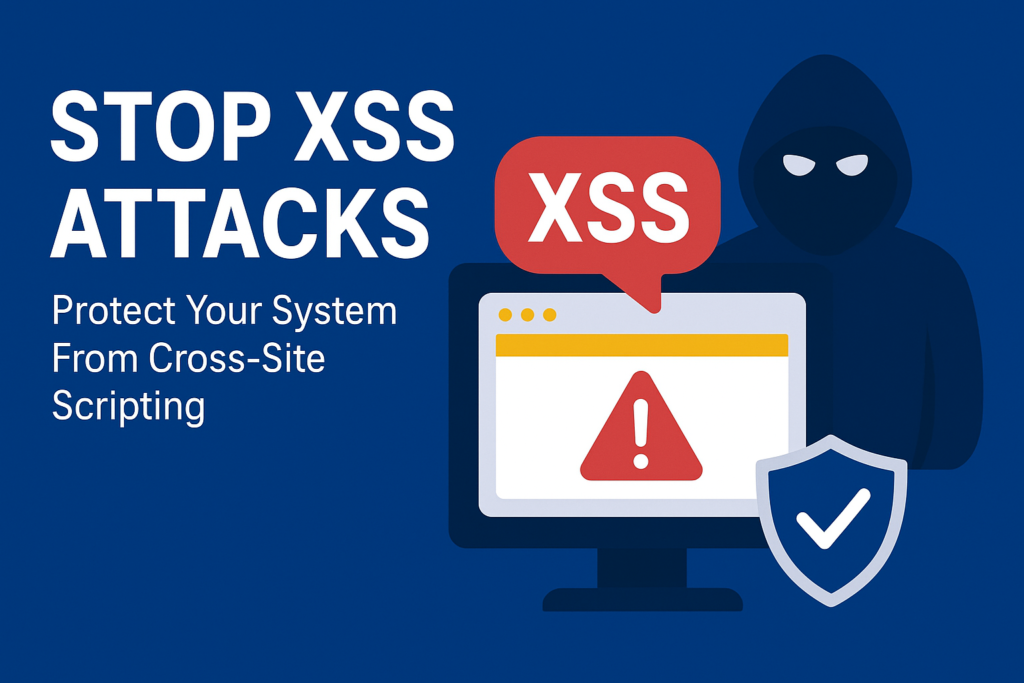
Before diving into the code implementation in Spring Boot part lets figure out what is Cross-Site Scripting (XSS)
Definition: XSS, or Cross-Site Scripting is a security vulnerability found in web applications. It allows attackers to inject malicious scripts, especially JavaScript into webpages viewed by other users. This can lead to unauthorized access, data theft and manipulation, or session hijacking.
Types of XSS Attacks:
XSS attacks generally fall into three categories:
Stored XSS: The malicious script is stored in server database when a user send request the server will served this to that particular page.
Reflected XSS: The malicious script is embedded in a URL and reflected to the user from the server.
DOM-Based XSS: The attacks happen within the Document Object Model (DOM) of the web page, without any server interaction.
Impact of XSS Attack:
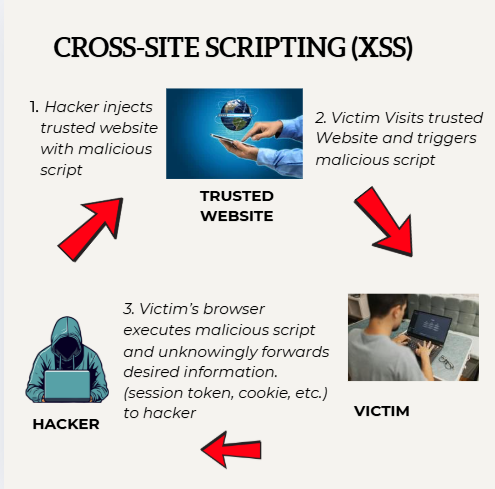
XSS attacks can have severe consequences, including:
- Data Theft: Attackers can steal sensitive information such as cookies, session tokens, and personal data.
- Session Hijacking: Attackers can hijack a user’s session and perform unauthorized actions on their behalf.
- Defacement: Attackers can modify the appearance of web pages, displaying unwanted content.
How to prevent XSS in Spring Boot?
The Golden rule: Validate inputs, sanitize them, and encode outputs. Don’t just filter on the way in -protect on the way out too, Because data can come from database or APIs.
Real-world context: In a user registration page, someone tries to inject image, as the username. Without validation, it renders and runs on profile pages.
For this, Use Hibernate Validator for bean validation, and libraries like Jsoup for HTML sanitization.
// In your UserDTO.java import javax.validation.constraints.NotBlank; import javax.validation.constraints.Size;

// In your UserDTO.java
import javax.validation.constraints.NotBlank;
import javax.validation.constraints.Size;

public class UserDTO {
    @NotBlank(message = "Name can't be empty")
    @Size(max = 50, message = "Name too long")
    private String name;
    // getters/setters
}- Using Content Security Policy(CSP) :
- Why? Tells browsers what scripts/images are allowed, blocking unauthorized ones.
- Real-world context: In a dashboard app, attackers try inline scripts. CSP stops them cold, even if encoding fails.
- How in Spring Boot? Use Spring Security to set HTTP headers.
- Example: Configure in your SecurityConfig.
@Configuration
public class SecurityConfig {
    @Bean
    public SecurityFilterChain securityFilterChain(HttpSecurity http) throws Exception {
        http.headers(headers -> headers
            .contentSecurityPolicy(csp -> csp
                .policyDirectives("default-src 'self'; script-src 'self' trusted.com;")));  // Customize as needed
        return http.build();
    }
}
This header goes in responses: Content-Security-Policy: default-src ‘self’; …. Test with browser dev tools—it’ll log blocked attempts.
- Leverage Spring Security and Custom Filters
Spring Security handles a lot out-of-the-box, like CSRF related to XSS), but add filters for extra XSS scrubbibng.
Real-world Context: API endpoints in a banking app. A filter catches and cleans query params before they hit controllers.
How? Create a filter that wraps requests.
Example Filter:
SanitizingStringDeserializer.java :
This class hijacks Jackson’s default behavior for Strings and ensures every incoming JSON string is sanitized using OWASP Encode before reaching your application.
Hackers often try to inject <script> tags or malicious HTML. You don’t have to manually sanitize strings everywhere in your code. Jackson + this deserializer does it for you.
Centralized: All incoming JSON String fields are automatically protected.
package com.techspacenepal.spacewrites.common.security.xss;

import com.fasterxml.jackson.core.JsonParser;
import com.fasterxml.jackson.databind.DeserializationContext;
import com.fasterxml.jackson.databind.deser.std.StdScalarDeserializer;
import org.owasp.encoder.Encode;

import java.io.IOException;

public class SanitizingStringDeserializer extends StdScalarDeserializer<String> {

    public SanitizingStringDeserializer() {
        super(String.class);
    }

    @Override
    public String deserialize(JsonParser parser, DeserializationContext ctxt) throws IOException {
        String value = parser.getValueAsString();
        if(value==null){
            return null;
        }
        return Encode.forHtml(value);   //will escape HTML special characters so that they can’t run as code in the browser.
    }
}
SanitizingModuleInterceptor.java:
This class tells Jackson, whenever you convert JSON Strings into Java Strings, use my sanitizer instead of the default. So basically, it registers your custom sanitizingStringDeserializer with Jackson’s ObjectMapper.
@Component
public class SanitizerModuleInterceptor {

    private final ObjectMapper mapper;

    public SanitizerModuleInterceptor(final ObjectMapper mapper) {
        this.mapper = mapper;
    }

    @PostConstruct
    public void registerSanitizer(){
        SimpleModule sanitizeModule = new SimpleModule();

        sanitizeModule.addDeserializer(String.class, new SanitizingStringDeserializer());
        mapper.registerModule(sanitizeModule);
    }

}
SanitizingStringWebConfig.java:
This config makes sure any request parameter String (from URL or form) gets sanitized before reaching the controller. It escapes HTML tags so attackers cannot inject malicious scripts.
@Configuration
@RequiredArgsConstructor
public class SanitizingStringWebConfig implements WebMvcConfigurer {

    @Override
    public void addFormatters(FormatterRegistry registry){
        registry.addFormatter(new SanitizingStringFormatter());
    }


    @NonNullApi static class SanitizingStringFormatter implements Formatter<String> {

        @Override
        public String print(@Nonnull String object, @Nonnull Locale locale) {
            return object;
        }

        @Override
        public String parse(@Nonnull String text,@Nonnull Locale locale) throws ParseException {
            return HtmlUtils.htmlEscape(text);
        }
    }

}
Conclusion
XSS attacks pose a significant threat to web applications, but they can be effectively reduced through careful input validation, output encoding, and security policies. By following the techniques outlined in this article, you can secure your Spring Boot applications against XSS attacks.
Remember, security is an ongoing process, and it’s essential to stay informed about the latest threats and best practices.
If you have any questions or need further clarification, feel free to leave a comment below. I’m here to help!
