



Imagine you’re running an online shop where customers leave reviews for products. One day, a sneaky user adds a comment with hidden code that steals other customers’ login details when they read it. This is called a Cross-Site Scripting (XSS) attack, and it can break trust, lose money, and even get your site shut down. As a developer in Nepal or India, where many small businesses go online, facing such risks is common. But don’t worry—there’s a way to stop this.
In this post, I’ll explain XSS in easy words, why it’s a big problem (especially for e-commerce), and how to fix it using Spring Boot. We’ll use tools like Jackson for JSON data and Spring’s own features for forms. I’ll give a step-by-step guide with code, and show an example for an e-commerce system. This is based on best practices from experts like OWASP.
Key Points:
- XSS happens when bad code sneaks into your app and runs in users’ browsers—it seems common but can be prevented with care.
- Research suggests that proper input cleaning and output encoding stop most attacks, though no solution is 100% perfect due to new tricks hackers find.
- For e-commerce, risks like stolen payments or fake reviews are high, but simple steps like the ones here can make your app safer.
- Always test your fixes, as evidence shows untested code often misses hidden issues.
By the end, you’ll know how to add this security to your project. Let’s dive in.
The Pain Point: Why XSS is a Headache for Web Developers
Hello friends! If you’re building web apps, especially in places like Kathmandu or Mumbai where startups are booming, you’ve probably heard of security issues. One big one is Cross-Site Scripting, or XSS. In simple terms, XSS is when a hacker injects harmful code (like JavaScript) into your website. This code runs in other users’ browsers and can do bad things, like stealing passwords or changing page content.
Why is this a pain?
- It breaks trust: Customers expect safe shopping. If hackers steal data, people stop coming back.
- It costs money: Fixing after an attack is expensive—think legal fees or lost sales.
- It’s common: According to reports, XSS is one of the top web risks. In e-commerce, where users add reviews, addresses, or search for products, it’s easy for hackers to slip in code.
Take real examples:
- In 2018, British Airways had an XSS attack where hackers stole credit card details from 380,000 customers. It started from a simple script in their site.
- eBay once had a bug where fake listings appeared due to XSS, tricking buyers into scams.
- In Japan, attackers used XSS on e-commerce forms to hijack orders and steal info.
For an e-commerce system, imagine a user posting a product review: “<script>stealMyData()</script>”. Without protection, this shows up on the product page and runs for everyone who views it. Scary, right? This is stored XSS. Or, in search bars, reflected XSS bounces bad input back immediately.
If you’re using Spring Boot for the backend (like many of us do for quick APIs) and Next.js for the front, you need to act. But good news: We can fix this with input sanitization—cleaning data as it comes in.
-
Introducing the Solution: Sanitize Inputs in Spring Boot
The best way to fight XSS is to “escape” special characters. For example, change “<” to “<” so browsers see it as text, not code. We’ll use:
- OWASP Java Encoder: A free tool to safely encode data.
- Jackson: For cleaning JSON inputs (common in APIs).
- Spring Formatters: For form data.
This setup escapes HTML in strings, stopping scripts from running. It’s not the only way—output encoding or Content Security Policy (CSP) helps too—but it’s a strong start for backends.
Step-by-Step Guide: Implementing XSS Protection
Follow these steps in your Spring Boot project. Assume you have Maven or Gradle for dependencies.
Step 1: Add Dependencies
First, add libraries to your pom.xml (for Maven) or build.gradle.
- OWASP Encoder: For safe HTML escaping.
- Jackson: Already in Spring Boot, but ensure it’s there.
Code for build.gradle.kts and POM.XML (choose one):
Why this: This gives Encode.forHtml() to clean strings.
//for xss attack prevention
 implementation("org.owasp.encoder:encoder:1.3.1")

//OR,
<dependencies>
<dependency>
<groupId>org.owasp.encoder</groupId>
<artifactId>encoder</artifactId>
<version>1.2.3</version>  <!-- Check latest version -->
</dependency>
</dependencies>
Create a SanititzingStringDeserializer.java:
package org.khetbari.common.security.xss;

import com.fasterxml.jackson.core.JsonParser;
import com.fasterxml.jackson.databind.DeserializationContext;
import com.fasterxml.jackson.databind.deser.std.StdDeserializer;
import org.owasp.encoder.Encode;

import java.io.IOException;

//Extends Jackson’s default string deserializer.
//
//Means we are customizing how Strings are read from incoming JSON.
public class SanitizingStringDeserializer extends StdDeserializer<String> {

    public SanitizingStringDeserializer() {
        super(String.class);
    }


    @Override
    public String deserialize(JsonParser parser, DeserializationContext ctxt) throws IOException {
        String value = parser.getValueAsString();


        if (value == null) {
            return null;
        }
        return Encode.forHtml(value);
    }
}
Important:
This uses OWASP Java Encoder, which safely escapes special characters. <script> -> <script>
” -> "
‘ -> ‘
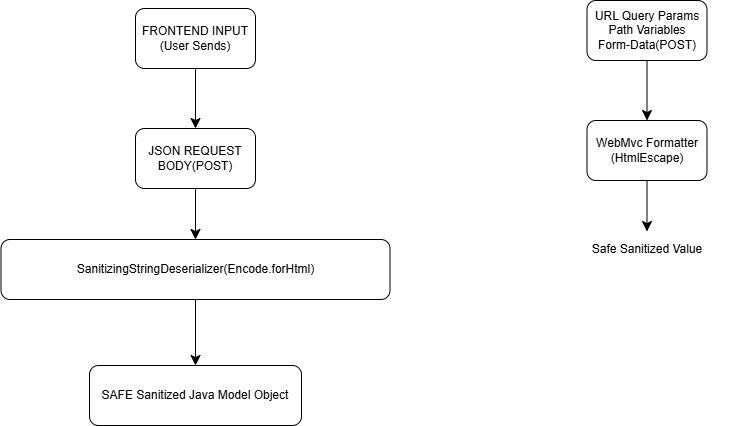
This prevents JavaScript execution when data is displayed on frontend. To conclude: Any String from JSON will be sanitized using OWASP before being converted into a Java object.
Then Create this second class : SanitizerModuleInteceptor.java:
package org.khetbari.common.security.xss;
import com.fasterxml.jackson.databind.ObjectMapper;
import com.fasterxml.jackson.databind.module.SimpleModule;
import jakarta.annotation.PostConstruct;
import org.springframework.stereotype.Component;
@Component
public class SanitizerModuleInterceptor {
private final ObjectMapper mapper;
public SanitizerModuleInterceptor(final ObjectMapper mapper) {
this.mapper = mapper;
}
@PostConstruct
public void registerSanitizer(){
SimpleModule sanitizeModule = new SimpleModule();
sanitizeModule.addDeserializer(String.class, new SanitizingStringDeserializer());
mapper.registerModule(sanitizeModule);
}
}
//📌 Result of File 1
//Every JSON string sent from frontend → backend will be escaped (example: <script> becomes <script>) before saving.
