



Most of the time we get confused which one is better, JPQL or Native Query. The simple answer is, both are best on the use case. Before moving on this guide, make sure you read my previous article Spring JPA, It is crucial to understand the fundamentals before diving deeper into queries. Visit this link : https://bytespacenepal.com/spring-jpa/ .
If you’re already comfortable with Spring JPA. Then Lets dive into our topic: JPQL vs Native Query When working with Spring JPA, You have three main ways to query your database:
- Derived Query Methods – Spring generates queries from method names
- JPQL (Java Persistence Query Language) – Object-oriented query language
- Native SQL Queries – Direct SQL that talks to your specific database
While derived queries are great for simple operations (like findByEmail(String email)), real-world applications need more power. That’s where JPQL and Native Queries come in.
Then What is JPQL?
JPQL (Java Persistence Query Language) is an object-oriented query language that works with your entity classes, not database tables. Think of it as SQL, but instead of table names and column names, you use Java class names, and field names. 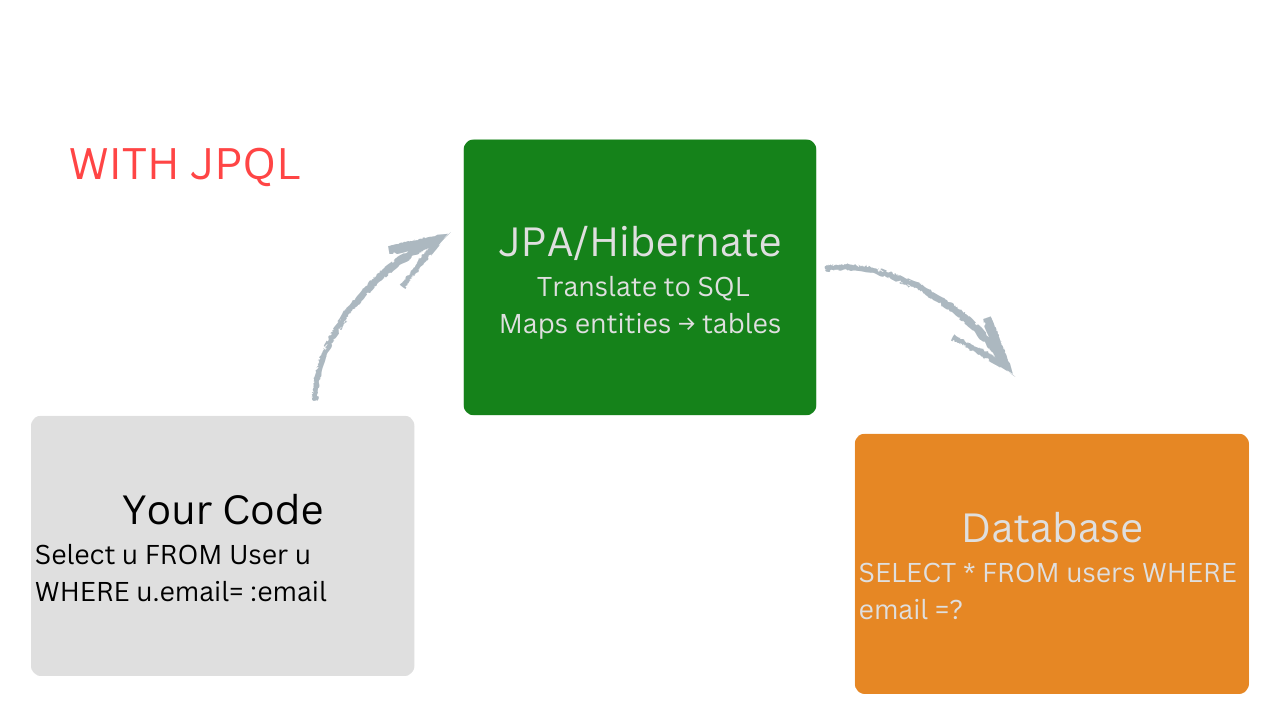
Key concept: JPQL queries are written against the entity model, not the database schema. This means they are database-independent and work with your java objects directly. JPQL Syntax Example
// Entity class name, not table name@Query("SELECT u FROM User u WHERE u.email = :email") User findUserByEmail(@Param("email") String email);// Notice: "User" is the entity class, "u.email" is the Java field// NOT "users" table or "email" column - those are database detail
Real-World JPQL Examples
1. Simple Selection with Condition
@Query("SELECT p FROM Product p WHERE p.price < :maxPrice")List<Product> findAffordableProducts(@Param("maxPrice") BigDecimal maxPrice);// SQL equivalent would be: // SELECT * FROM products WHERE price < ?
2. Joining Related Entities
// Fetch users with their orders in one query (solving N+1 problem!)@Query("SELECT u FROM User u LEFT JOIN FETCH u.orders WHERE u.id = :id")User findUserWithOrders(@Param("id") Long id);// The JOIN FETCH tells JPA to load orders eagerly in the same query// This is the solution to N+1 problem we discussed earlier!
3. Aggregations and Group By
// Count orders per user@Query("SELECT u.name, COUNT(o) FROM User u JOIN u.orders o GROUP BY u.name") List<Object[]> countOrdersByUser();// Returns array: ["Ram Kumar", 5], ["Sita Sharma", 3], etc.
4. Complex Filtering
// Find active products in stock within price range@Query("SELECT p FROM Product p WHERE " + "p.stockQuantity > 0 AND " + "p.price BETWEEN:minPrice AND :maxPrice AND " + "p.active = true " + "ORDER BY p.price ASC")List<Product> findAvailableProductsInRange( @Param("minPrice")BigDecimal minPrice, @Param("maxPrice") BigDecimal maxPrice );
5. Using DTOs (Data Transfer Objects)
// Instead of returning full entities, return only what you need@Query("SELECT new com.example.dto.UserSummary(u.id, u.name, u.email) " + "FROM User u WHERE u.active = true")List<UserSummary> findActiveUserSummaries();// UserSummary is a simple class with constructor matching the query// This is more efficient than loading full User entities
6. Date Range Queries
// Find orders from last 30 days@Query("SELECT o FROM Order o WHERE " + "o.orderDate >= :startDate AND " +"o.orderDate <= :endDate") List<Order> findOrdersInDateRange( @Param("startDate") LocalDateTimestartDate, @Param("endDate") LocalDateTime endDate );
What are Native Queries?
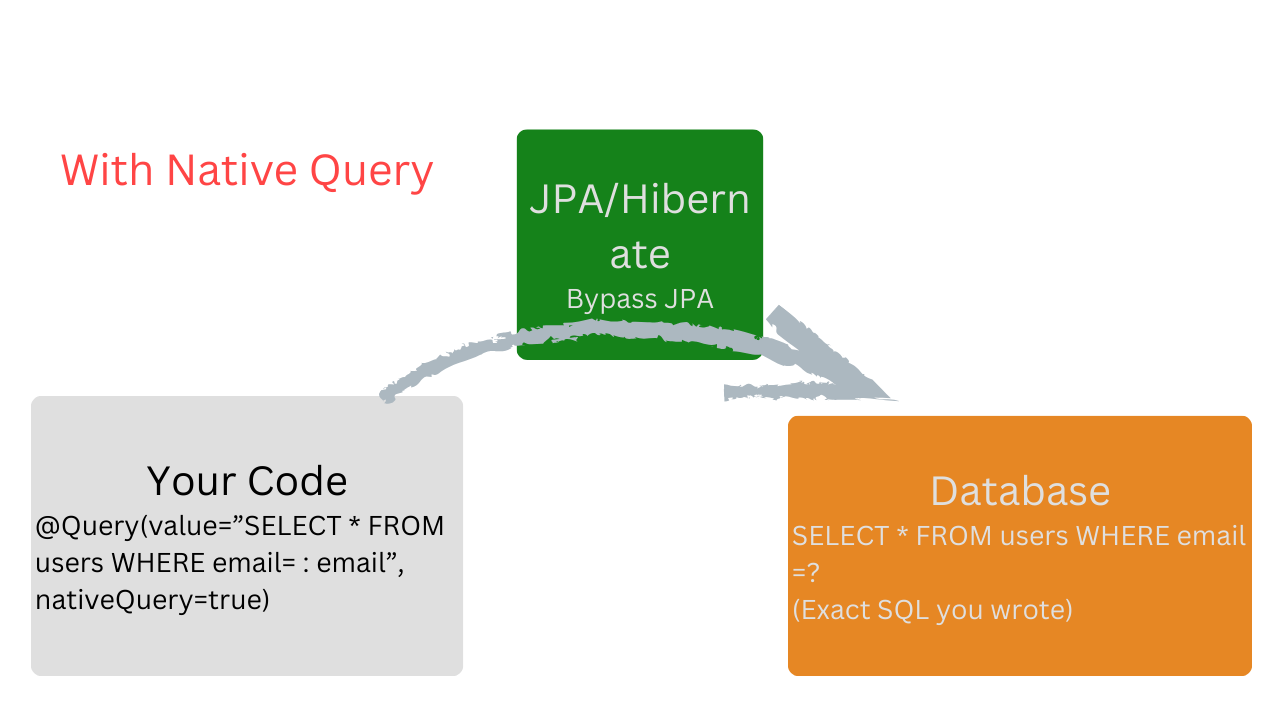
- Native queries are raw SQL statements that execute directly against your database. They bypass JPA’s abstraction layer and give you full control over the SQL.
 When we need database-specific features that JPQL doesn’t support, or when we need maximum performance optimization that requires hands-tuned SQL. Advantatges:Full Access to database features
 - Maximum performance control
- Use database specific functions
- Existing SQL can be reused
- Disadvantages:Tied to specific database
- No automatic entity mapping
- Harder to maintain & refactor
- Breaks if schema changes
Native Query Syntax
@Query(value="SELECT * FROM users WHERE email=:email", nativeQuery=true)User findUserbyEmail(@Param("email") String email);
Here, nativeQuery=true, enable us to use actual table/column names, Here we are using actual table name “users” instead of “User” (entity name).
Real-World Native Query Examples
1. Database-Specific Functions
@Query(value="SELECT * FROM produts" + "WHERE MATCH(name, description)AGAINST("searchTerm IN BOOLEAN MODE)", nativeQuery = true)List<Product> fullTextSearch(@Param("searchTerm") String searchTerm);
We are doing FULLTEXT search (not available in JPQL)
2. Complex Joins with Multiple Tables
@Query(values="SELECT " +"p.name as product_name," + "COUNT(op.id) as total_sold,"+"SUM(op.quantity * p.price) as revenue"+ "FROM products p" +"JOIN order_products op ON p.id = op.product_id" + "JOIN orders o ON op.order_id = o.id" +"WHERE o.order_date BETWEEN :startDate AND :endDate" +"GROUP BY p.id, p.name" + "ORDER BY revenue DESC",nativeQuery = true)List<Object[]> getSalesReport(@Param("startDate") LocalDateTime startDate,@Param("endDate") LocalDateTime endDate);
3. Window Functions (PostgreSQL/ MySQL 8+)
Rank products by sales within each category
@Query(value = "SELECT"+"p.name," +"p.category," +"SUM(op.quanityt) as total_sales," +"RANK() OVER (PARTITION BY p.category ORDER BY SUM(op.quantity) DESC) as rank"+"FROM products p" +" JOIN order_products op ON p.id = product_id" +"GROUP BY p.id, p.name, p.category", nativeQuery= true)List<Object[]> rankProductByCategory();
4. Recursive CTEs (Common Table Expressions)
Find all employees unde a manage (hierarchical data)
@Query(values ="WITH RECURSIVE employee_hierarchy AS ("+"SELECT id, name, manage_id, 1 as level" +"FROM employees WHERE id = :managerId" + " UNION ALL" +"SELECT e.id, e.name, e.manager_id, eh.level + 1" + "FROM employees e"+"JOIN employee_hierarchy eh ON e.manager_id = eh.id"+"SELECT * FROM employee_hierarchy", nativeQuery = true)List<Object[]> findEmployeeHierarchy(@Param("mangerId") Long managerId);
5. Bulk Updates for Performance
// Update thousands of records efficiently@Modifying @Query( value = "UPDATE products SET price = price * 1.1 " +"WHERE category = :category AND last_updated < :date", nativeQuery = true )int increasePricesByCategory( @Param("category") String category, @Param("date") LocalDateTime date );
6. GIS/ Spatial Queries (PostgreSQL with PostGIS)
Find stores withing 5km of user’s location
@Query(value ="SELECT * FROM stores" + WHERE ST_DWithin("+"location::geography," + "ST_MakePoint(:longitude, :latitude)::geography, " + "5000"+")" + "ORDER BY ST_Distance(location::geography, ST_MakePoint(:longitude, :latitude):: geography)",nativeQuery = true)List<Store> findNearbyStores(@Param("latitude") Double latitude, @Param("longitude") Double longitude);
Aspect JPQL Native Query Syntax Uses entity and field names (Java) Uses table and column names (SQL) Database Independence YES – Works across all databases NO – Tied to specific database Return Type Automatically maps to entities Returns Object[] or requires manual mapping Type Safety Better – Validated against entity model Weaker – Only validated at runtime Refactoring Easier – Rename fields, queries update Harder – Must manually update SQL Performance Good for most cases Better – Full optimization control Complex Queries Limited to JPA features Unlimited – Any SQL feature available Database Features Limited – Only what JPA supports Full Access – All database-specific features Learning Curve Must learn JPQL syntax Use existing SQL knowledge Maintenance Easier – Abstracted from schema Harder – Breaks if schema changes 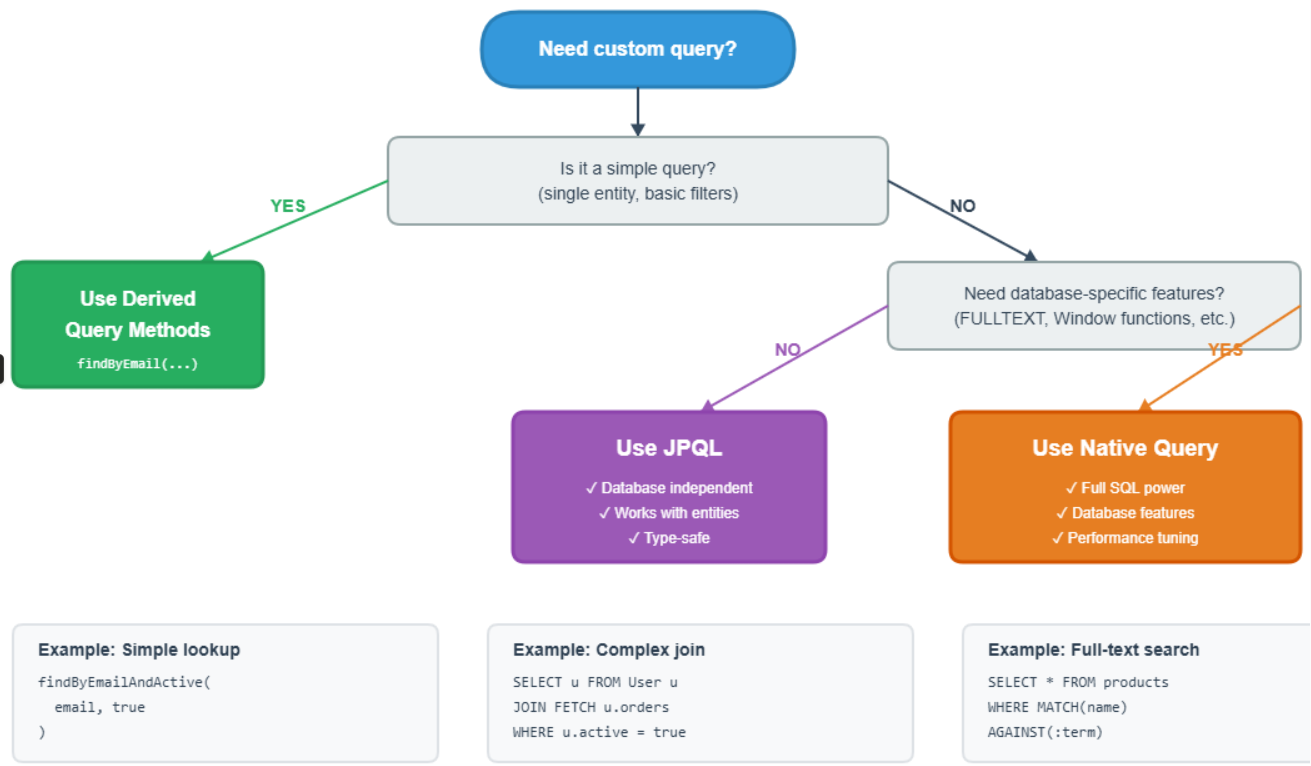
JPQl vs Native Query
Use JPQL When:
- Your query works with entities and their relationships
- You want database independence (might switch from MySQL to PostgreSQL)
- The query is straightforward and doesn’t need advanced SQL features
- You’re doing standard CRUD operations with filters
- You want automatic entity mapping
- You need to leverage JPA’s caching mechanisms
Use Native Queries When:
- You need database-specific features (full-text search, GIS, JSON functions)
- Performance is critical and you need hand-tuned SQL
- You’re working with complex joins across many tables
- You need window functions, CTEs, or recursive queries
- You’re migrating legacy SQL code to Spring Boot
- You need to query database views or stored procedures
- JPQL becomes too complex or doesn’t support what you need
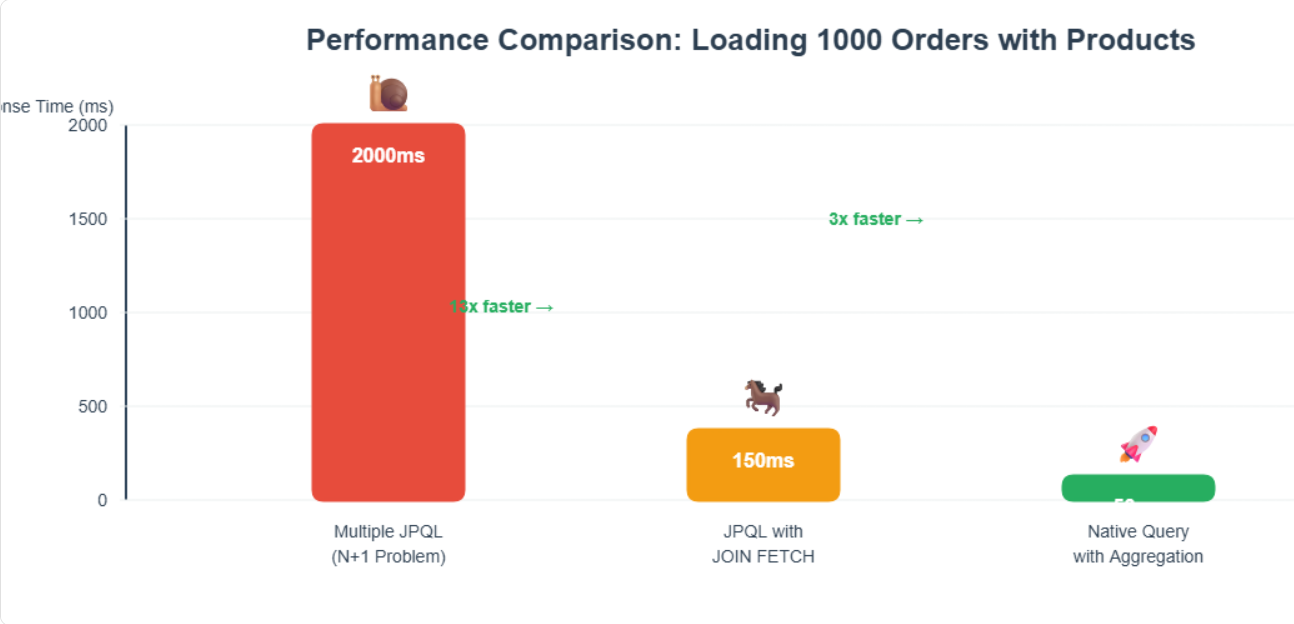
Bonus Tips for Production:
Important:
Command(Create/update/delete) = Entity + JPQL
Queries(read-only, UI Driven) = Native SQL + Projection
- Always use pagination for large result sets
- Add indexes on columns used in WHERE clauses
- Use @Transactional(readOnly = true) for read queries
- Monitor query performance with spring.jpa.show-sql=true during development
- Consider caching for frequently accessed, rarely changed data
- Use projections/DTOs instead of loading full entities when possible
