



We’ve all been there: you’ve just finished a brilliant feature, the code looks clean, and it runs perfectly on your local machine. But the moment you push it to production? Everything breaks. Perhaps you forgot to run the tests, or maybe the deployment environment has a slightly different configuration than your laptop. This is where GitHub actions comes in play.
Introduction
GitHub Actions is a continuous integration and continuous delivery (CI/CD) platform that allows you to automate your build, test, and deployment pipeline. You can write steps to perform on your code to build, test, and deploy your code like a to do list on a separate file (YAML) and also can monitor it via GitHub to check if any error occurs in any step.

Development of a project without GitHub action’s CI/CD pipelines :
- Code works on your personal laptop but crashes on the server due to different OS or software versions.
- Spending 20 minutes manually building and uploading files instead of writing new features.
- Relying on memory to run test suites leads to broken code reaching production.
Actions provides automation of test. build, and deployment on any environment of your choice in a separate server(runner) offloading the heavy lifting to GitHub’s servers so your local machine stays fast and unverified code never reaches deployment.This eliminates all the above problems.
Core Concepts of Actions
Workflow
A Workflow is a configurable automated process that will run one or more jobs. It is defined by a YAML (.yml) file checked into your repository and will run when triggered by an event in your repository, or they can be triggered manually, or at a defined schedule.
You need you .yml/.yaml file in folder location below for GitHub to locate it.
your-repo/.github/workflows/main.yml
Inside YAML file
name: Deploy to Render # 1. The Nameon: # 2. The Triggerpush:branches:- mainjobs: # 3. The Jobstest:runs-on: ubuntu-latest # 4. The Runnersteps: # 5. The Steps- uses: actions/checkout@v4 # 6. The Action- name: Set up Pythonuses: actions/setup-python@v5with:python-version: '3.13'- name: Install Pipenv and Dependenciesrun: |pip install pipenvpipenv install --dev- name: Run Testsrun: pipenv run python manage.py testdeploy:needs: test # This ensures deployment ONLY happens if tests passruns-on: ubuntu-lateststeps:- name: Checkout Codeuses: actions/checkout@v4- name: Trigger Render Deploymentuses: johnbeynon/render-deploy-action@v0.0.8with:service-id: ${{ secrets.RENDER_SERVICE_ID }}api-key: ${{ secrets.RENDER_API_KEY }}
Name:
This is the display name that appears in the “Actions” tab of your GitHub repo. Helps identify specific task in action tab during monitoring.
Trigger:
This defines what starts the robot. In above yaml file every time you push code to main branch in GitHub, the process begins.
git push origin main

Other triggers:
pull_request: Ideal for teams; this runs your workflow on a temporary branch to verify code quality before it is merged into your main code base.
schedule: Runs tasks at specific intervals (like every night at midnight) using Cron syntax, perfect for backups or security scans.
workflow_dispatch: Provides a manual “Run workflow” button in the GitHub UI, giving you human control over when a process starts.
release: Only triggers when a new version of your software is officially tagged and published, ensuring production deployments only happen for stable code.
Jobs:
In GitHub Actions, a Job is a way to isolate tasks within their own dedicated environments. By separating your Testing and Deployment into different jobs, you ensure they never collide or interfere with one another. This setup also unlocks Parallelism, allowing multiple tasks to run simultaneously to save you time.
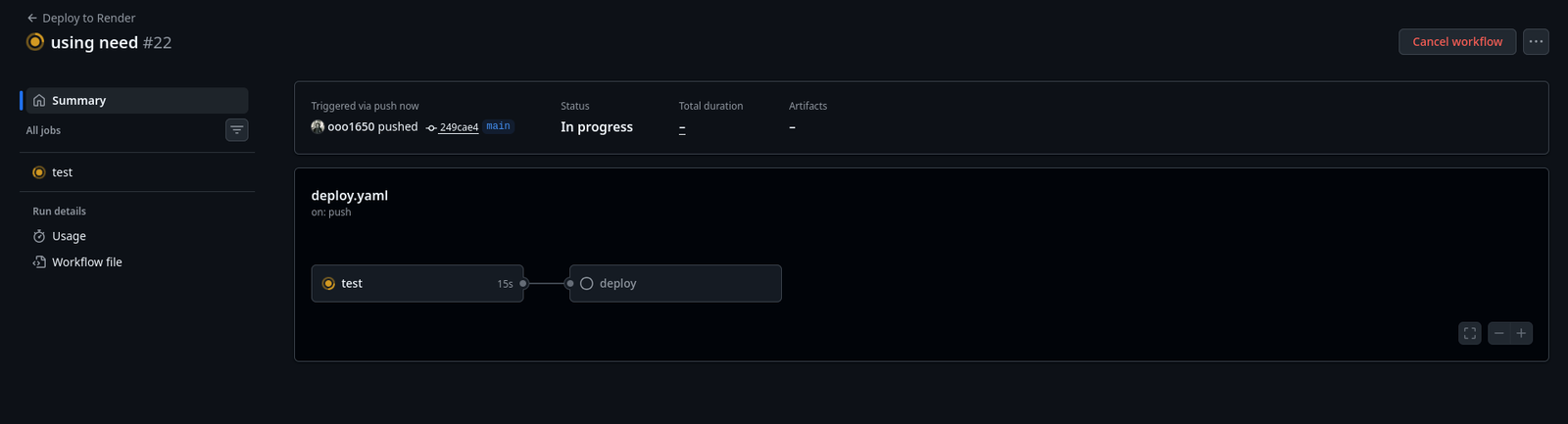
However, there are times when you don’t want things happening at once you shouldn’t be deploying code while it’s still being tested! To prevent “buggy” code from reaching production, you can disable parallelism for specific jobs by using the needs: <job-name> keyword. This acts as a safety gate: the deployment job won’t even wake up unless the testing job finishes with a perfect green check mark. Essentially, a workflow is just a collection of these jobs, running either all at once to be fast or in a specific order to stay safe.
Steps:
Steps are the individual tasks that make up a job. Think of them as the granular items on your to-do list that the runner must check off in order. In your workflow file, each step is identified by a dash (-) at the start of the line.
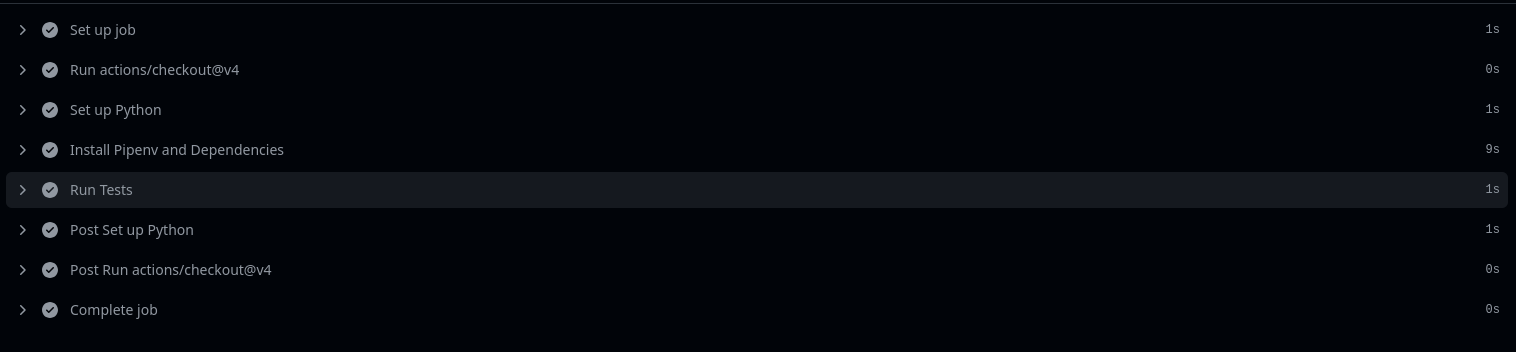
The content of a step varies depending on its purpose one might be a simple shell command like pip install, while another might be a complex pre-built action used to “Set up Python.” When you navigate to the GitHub Actions menu and click into a specific Job, these steps are exactly what you see being executed in real-time.
steps:- uses: actions/checkout@v4- name: Set up Pythonuses: actions/setup-python@v5with:python-version: '3.13'

Actions:
Actions are standalone components that perform complex, repetitive tasks. Instead of writing fifty lines of code to log into a cloud provider or set up a specific language environment, you “plug in” an action created by GitHub or the community.You can browse for Action that is require for your case in
github.com/marketplace/actions.
Syntax:
actions/<action-name>
Run:
This tells GitHub to execute that specific line (or block of code) inside the runner’s shell (usually Bash on Linux or Power Shell on Windows).
run: |cd ~/Root_dirpull Github-repo-link
This script will run inside the server every time this step is executed making this pull request automated so that the developer can focus on developing new feature instead of pulling the code into the server every time.
Hands-on Demo: Testing and Deployment
In this demo, we are automating a Django application specifically a simple static page to show how a real pipeline functions. While production environments often require managing dedicated servers and hardware, we are using Render, a “Platform as a Service” (PaaS), to keep things streamlined.
Render is a cloud hosting tool that eliminates the headache of manual server configuration or network setup. It’s a perfect partner for GitHub Actions because it allows us to use “Deploy Hooks” or API keys to trigger updates automatically.For more on Render you can checkout https://render.com/ .
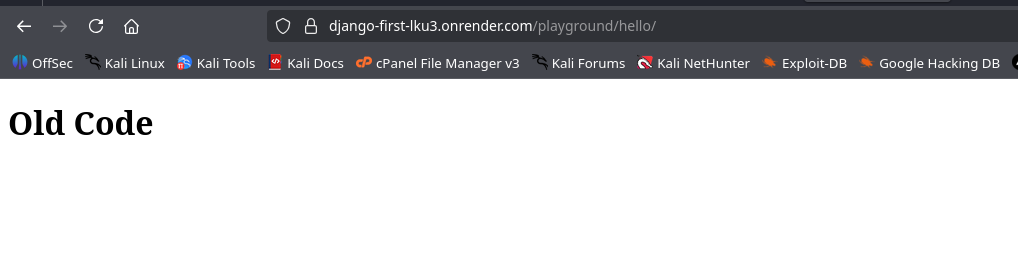
To demonstrate the power of automation, I’ve hosted a simple Django site on Render that currently displays the message: “Old Code.” Our goal is to replace this manual process with a robust CI/CD pipeline.
First, we focus on Continuous Integration (CI). We’ll verify our code across various Python versions and OS environments to ensure stability. To test the reliability of this “safety gate,” we will intentionally push a version containing an error. A successful CI setup should detect the failure and block the deployment, ensuring that “Broken Code” never replaces our “Old Code.”
Once the errors are resolved and the tests pass, Continuous Deployment (CD) takes over. The pipeline will automatically pull the latest code from GitHub, build the necessary environment, and push the update to the Render server. By the end of this demo, you’ll see the live site update to the new version seamlessly but only after the GitHub Actions “Test” job gives the green light.
Continuous Integration
Below is the content of YAML file i used to test my code in two different python versions 3.13 and 3.10.
name: Deploy to Renderon:push:branches:- mainjobs:test:runs-on: ubuntu-lateststeps:- uses: actions/checkout@v4- name: Set up Pythonuses: actions/setup-python@v5with:python-version: '3.13' # Uses py 3.13 version- name: Install Pipenv and Dependenciesrun: |pip install pipenvpipenv install --dev # Installs your packages from Pipfile- name: Run Tests# Note: We use 'pipenv run' because 'shell' is interactive and will hang the buildrun: pipenv run python manage.py testtest1:runs-on: ubuntu-lateststeps:- uses: actions/checkout@v4- name: Set up Pythonuses: actions/setup-python@v5with:python-version: '3.10' # Uses py 3.10 version- name: Install Pipenv and Dependenciesrun: |pip install pipenvpipenv install --dev # Installs your packages from Pipfile- name: Run Tests# Note: We use 'pipenv run' because 'shell' is interactive and will hang the buildrun: pipenv run python manage.py test
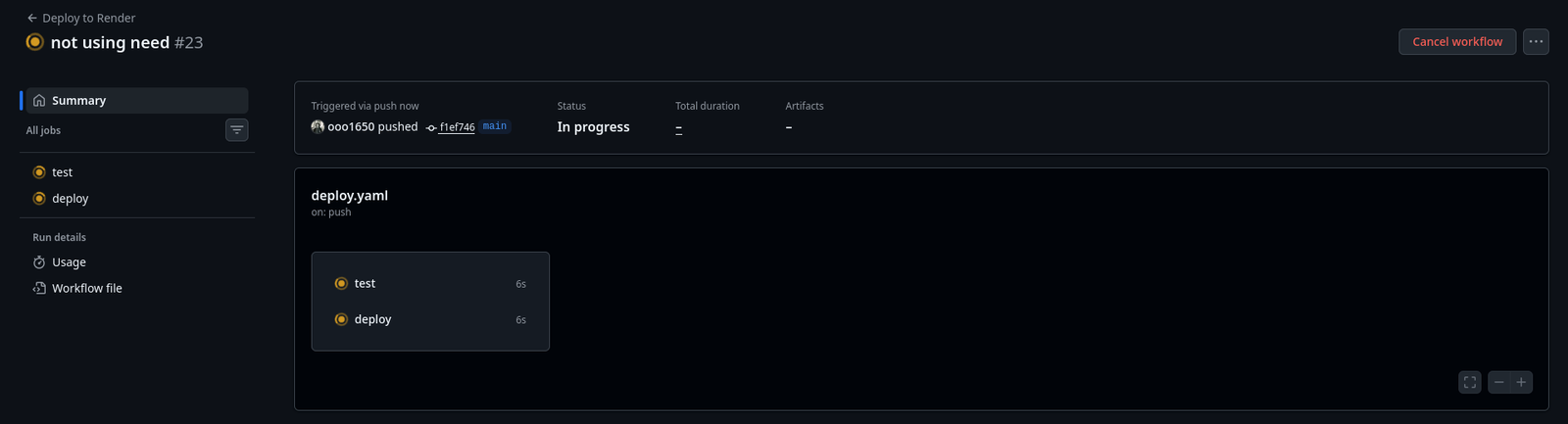
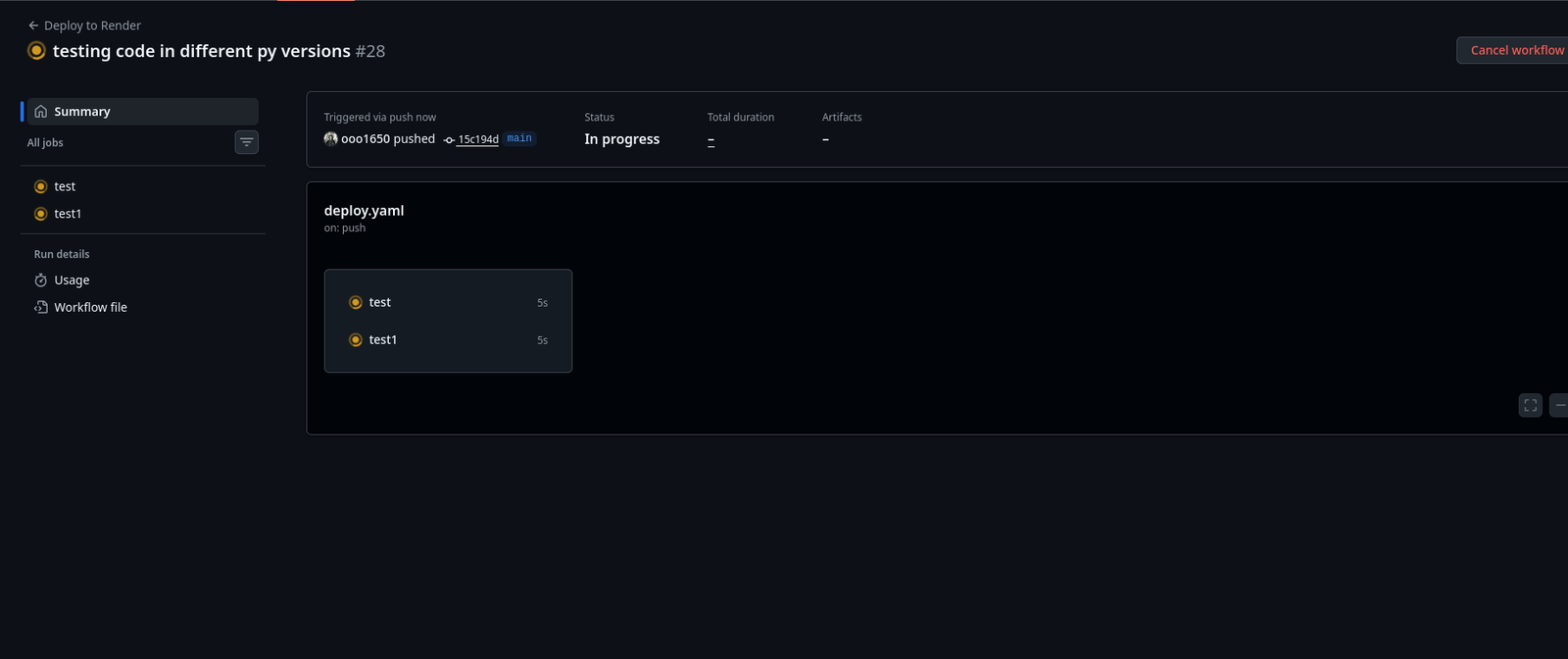
This visual highlights two critical strengths of a modern CI/CD pipeline: parallelism and instant automation.
By running the “test” and “test1” jobs in parallel, GitHub Actions avoids the bottleneck of a traditional queue. Instead of waiting for one task to finish before starting the next, both environments spin up simultaneously on separate runners, significantly reducing the total time it takes to get feedback on your code.
Furthermore, the image captures the moment the push trigger is activated. The second your code hits the GitHub repository, the workflow detects the event and executes your commands immediately. This removes the “human element” from the deployment process there is no manual clicking required to start the engine; the code itself acts as the catalyst for the entire build and test cycle.
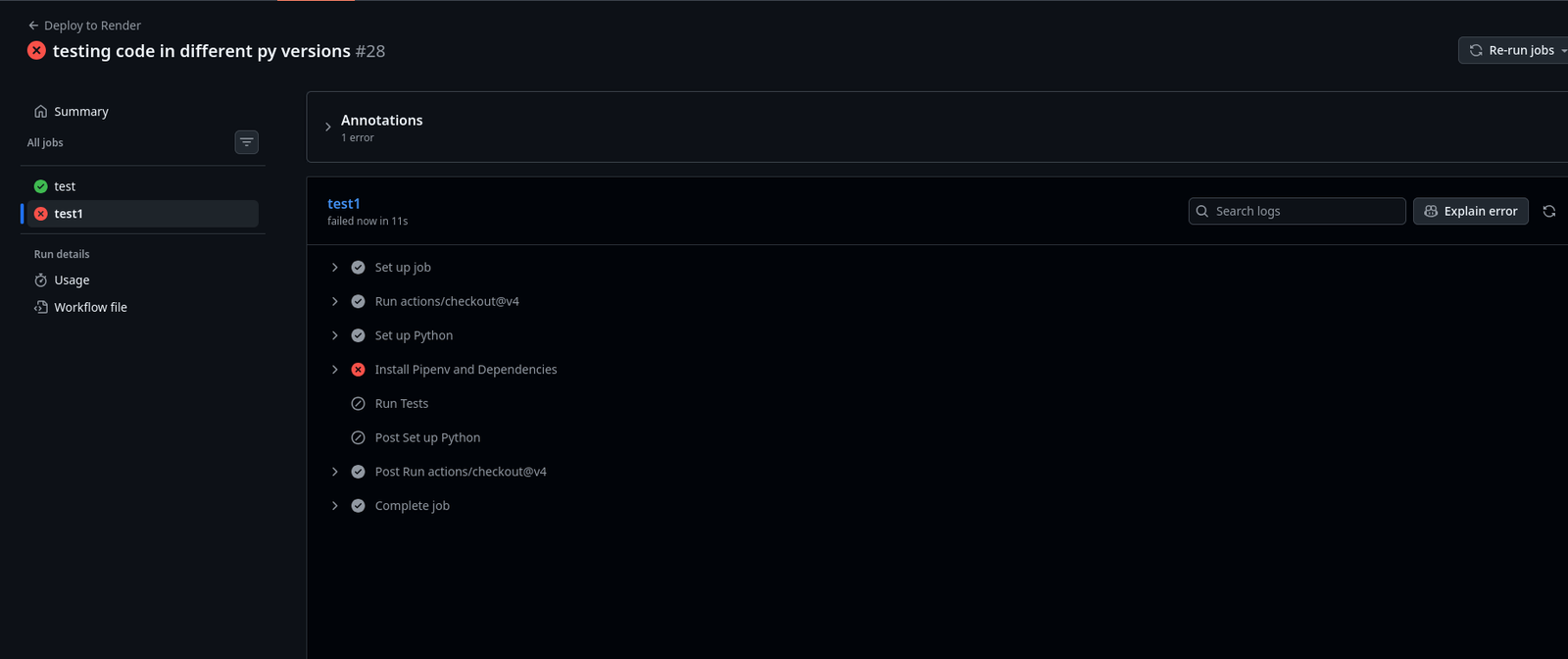
The results of this experiment provide a clear, data-driven conclusion: while our Django application is stable in a Python 3.13 environment, it is currently incompatible with Python 3.10. This distinction is vital; without this automated check, a developer might have unknowingly pushed an update that would have crashed on any server running an older version of Python.
This outcome perfectly demonstrates the fundamental value of Continuous Integration (CI). By simulating various operating systems and language versions before the code reaches the deployment stage, you create a “pre-flight check” that guarantees your production environment remains a bug-free zone.
Continuous Deployment
Below is the content of YAML file i used to deploy my code in Render server after testing to make sure it works before deploying it.
name: Deploy to Renderon:push:branches:- mainjobs:test:runs-on: ubuntu-lateststeps:- uses: actions/checkout@v4- name: Set up Pythonuses: actions/setup-python@v5with:python-version: '3.13'- name: Install Pipenv and Dependenciesrun: |pip install pipenvpipenv install --dev # Installs your packages from Pipfile- name: Run Tests# Note: We use 'pipenv run' because 'shell' is interactive and will hang the buildrun: pipenv run python manage.py testdeploy:needs: test # This ensures deployment ONLY happens if tests passruns-on: ubuntu-lateststeps:- name: Checkout Codeuses: actions/checkout@v4- name: Trigger Render Deploymentuses: johnbeynon/render-deploy-action@v0.0.8with:service-id: ${{ secrets.RENDER_SERVICE_ID }}api-key: ${{ secrets.RENDER_API_KEY }}
Bad code
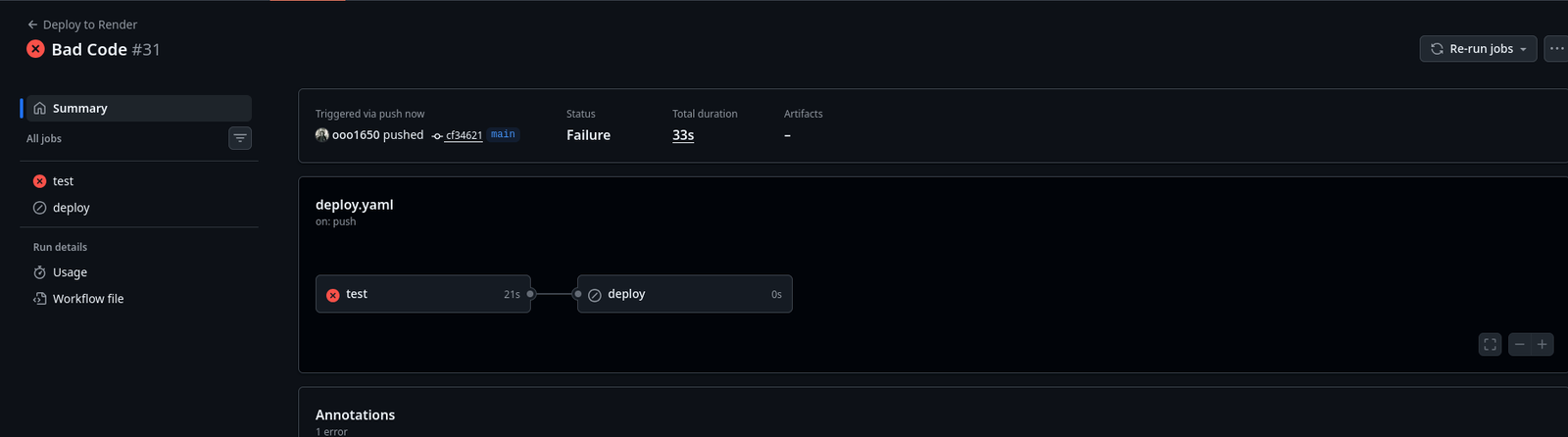
The action menu below demonstrates the “Safety Gate” in full effect. Unlike the previous parallel execution, the workflow is now configured with a strict dependency: the deploy job is locked until the test jobs finish successfully.
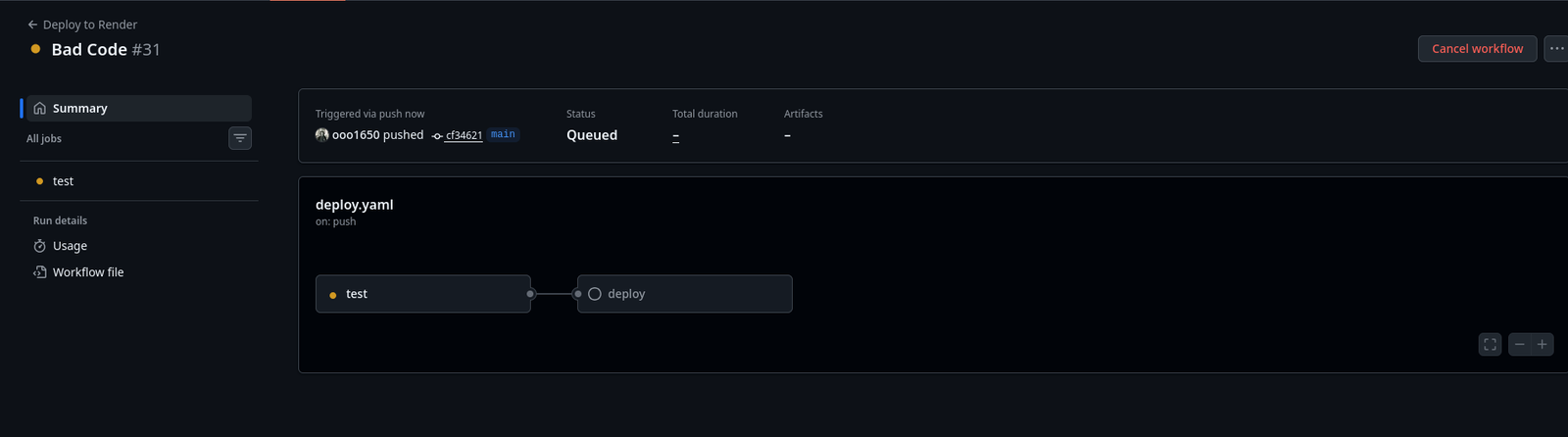
The test failed, the deployment was automatically blocked, ensuring that “bad code” never reaches the server. This transition from parallel to sequential execution proves that our CI/CD pipeline is working as intended—shielding our live Render environment from bugs by making successful testing a non-negotiable requirement for deployment.
Good Code
This image showcases the successful completion of the Continuous Deployment (CD) phase. Unlike the previous failure, the “Good Code” push passed the initial test job in 20 seconds, which automatically unlocked and triggered the deploy job. By establishing this sequential dependency, we’ve ensured that the live site on Render only updates after the code is proven stable. This automated handoff effectively eliminates manual errors, guaranteeing that every update reaching our users has been fully vetted by our CI/CD pipeline..
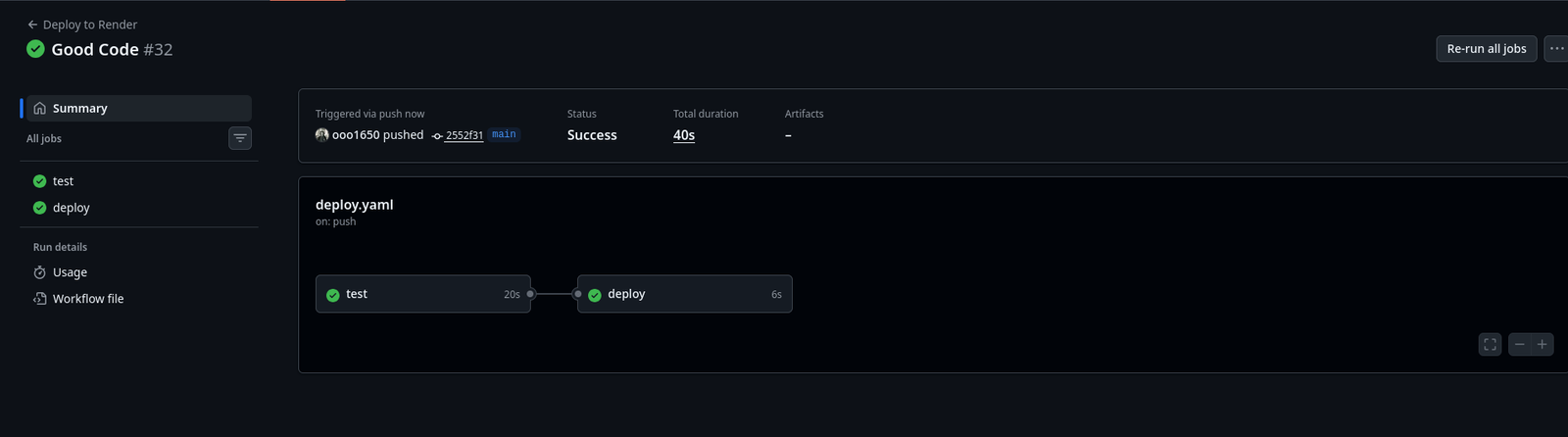
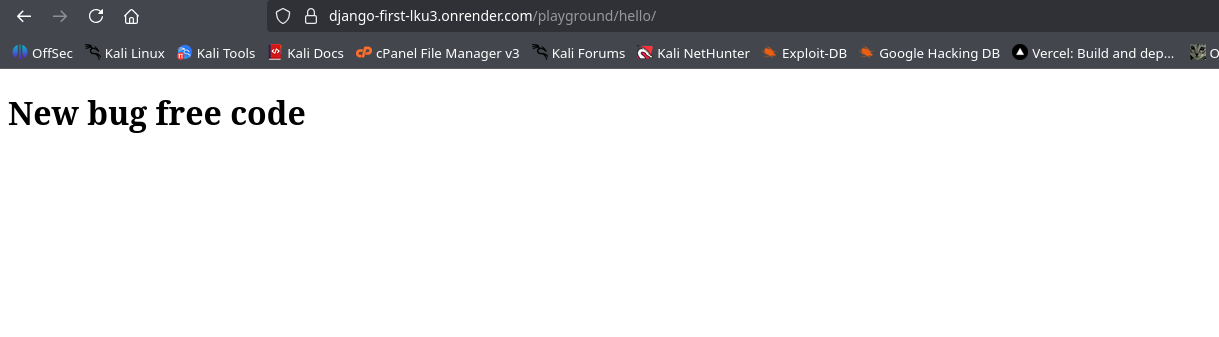
By automating the CI/CD pipeline, we shift the burden of manual verification from the developer to the system. This ensures that every phase testing, building, and hosting—is handled autonomously, allowing you to focus entirely on developing new features. As shown in the “Good Code” result, once the tests confirm stability, the deployment to Render triggers without any human intervention. This setup creates a reliable, repeatable process where high-quality code reaches the server faster and with significantly less risk.
Conclusion
The journey from “it works on my machine” to a professional production environment is defined by the reliability of your pipeline. Through this demonstration, we have seen how GitHub Actions and Render work in tandem to replace manual, error-prone tasks with a rigorous, automated system. By implementing a “Test-then-Deploy” strategy, we transformed our workflow into a high-speed safety gate that caught version-specific bugs before they could impact the live site.
The core value of this setup is the complete offloading of the building, testing, and hosting phases to GitHub’s runners. This shift ensures that the developer’s time is spent innovating on new features rather than troubleshooting environment mismatches or manually managing server resources. Ultimately, CI/CD provides a repeatable and predictable release cycle, ensuring that only verified “Good Code” ever reaches your users.
