



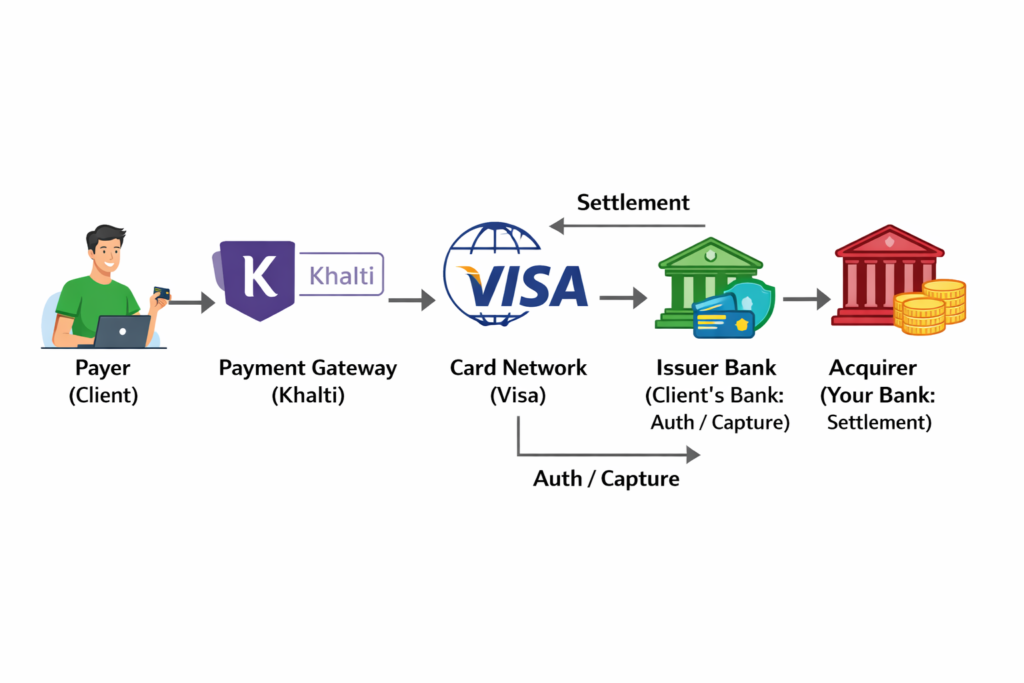
A payment system is a set of tools, procedures, and technologies, including banks, credit cards, and digital networks, designed to securely transfer monetary value between parties for goods, services, or obligations. Before diving into API docs and SDKs to integrate a payment gateway like Khalit or PayPal. Let’s unpack the fundamentals.
Let’s ground this in something you already know
Imagine you’re at your favorite corner shop in Kathmandu, grabbing a momo snack. You hand over a crisp NPR 100 note(cash).
- You give cash
- The shopkeeper receives it
- Both agree: “Payment done.”
That’s a payment system in its rawest form. No apps, no servers, just trust and physical exchange. Now, fast-forward to the digital world. Online payments swap cash for code and human trust for institutions like banks and gateways. It’s the same idea, but with layers of tech to make it secure and scalable. Now online payments replace cash + human trust with software + institutions.
Any Digital payment system must solve 4 core problems I’ll explain each simply. Try to connect to your projects (i.e., e-commerce or any system that needs a payment system)
1. Who is paying whom? (Identity)
- Is the payer a real person(not a bot or fraudster)?
- Is the receiver legit (your app’s merchant account, not a hacker’s wallet?
Solution: Logins, phone/email verification, and linking to bank or wallet accounts. For your freelancing platform, this means users sign up with verified emails, then connect their Khalti wallet. No fakes slipping through!
2. Is there enough money? (Authorization)
Before the money train leaves the station, check the fuel: Does the user have sufficient balance or credit? This happens pre-charge to avoid awkward “insufficient funds” dramas. Example: In your e-commerce cart, a user adds NPR 5,000 worth of gadgets. The system pings their wallet: “Got the cash?” If yes, proceed; if no, “Top up.”
3. Move the Money Safely (Transaction)
Deduct from the payer, credit to receiver (or hold in escrow for safety).
Must Have:
Atomic: All or nothing; like a database transaction. If deduction fails, rollback everything.
Secure: Encryption everywhere.
Logged: Track every step for debugging.
4. Proof & Record (Settlement + Ledger)
The receipt phase:
- Store transaction ID, time, amount, and status.
- Used later for disputes, refunds, and audits, this is why databases are critical.
Example: User queries a failed payment? Pull up the ledger: “See? It bounced at 8:27 PM on Feb 9, 2026—here’s why.” Databases are your best friend here. No ledger? Chaos ensues. So, the payment integration means outsourcing the heavy lifting to pros like Khalti, e-sewa, or PayPal.” They handle the core four; Letting the developer focus on UI, orders, and business rules.
So when people say:
“We integrated a payment gateway.” What they actually mean is: “We connected our system to someone else’s payment system instead of building all this ourselves.”
Where Khalti / PayPal Fit (high-level)
These gateways are like your payment partner. They provide:
- Identity verification
- Balance checking
- Secure transaction execution
- Transaction records
- Refunds & disputes
You bring:
- Business logic, the app’s flow (e.g., order confirmation).
- Fancy UI options.
- Escrow rules: Holds funds till the job’s approved. (optional)
General Flow Of Payment:
| Step | What happens |
| Order | Client/Consumer places order |
| Payment | Client pays via Khalti |
| Transaction | Money moves to the receiver account (or escrow) |
| Later | Escrow → Receiver transaction (optional) |
On-ramp and Off-ramp: Money’s Entry and Exit Doors
Think of your payment system as a busy airport.
On-Ramp: Getting money in
The process of getting real-world money into your digital system or wallet. Key points:
- Converts cash, card, or bank balance → digital balance
- Usually from client to platform/escrow wallet.
- Examples:
- Client pays via Khalti → platform wallet
- Client pays via credit card → platform wallet
Off-Ramp: Getting Money Out
The process of moving digital money back into the real world. Key Points:
- Converts digital balance → bank account/cash
- Usually, from the platform/escrow wallet to the writer
- Examples:
- Service Providers withdraw earnings to a bank account
- Payment processed via Khalti/PayPal payout
- In the freelancing context, the Service Provider withdraws NPR 5,000 earned from completed orders to their bank account.
- Simple analogy: On-ramp → lets money enter your system
- Off-ramp → lets money exit your system
A real payment platform must have both. Now let’s move to the next phase with some more important ideas. These are the crucial concepts that even experienced developers sometimes miss. We use examples from e-commerce or freelancing platforms, so it gets easy to understand.
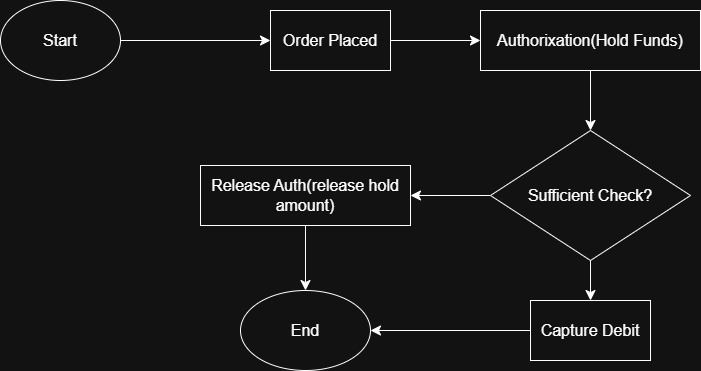
Authorization vs. Capture: The “Reserve” vs. “Collect” Dance
Imagine booking a hotel room. You enter your card details, and the hotel checks if you have enough money and holds NPR 10,000. But they don’t actually take the money yet. When you check out, they finally charge the real amount, maybe NPR 8,500 after discounts.
- Authorization = Reserve/ HoldIt’s just a temporary check and hold on money.
- The bank asks: “Does this person have enough balance?”
- Money is not taken, only reserved.
- If the payment is never completed, the hold automatically disappears after some days (usually 7-30 days).
- Capture = Collect/ Charge This is the actual payment.
- The money is actually deducted from the customer’s account.
Let me know your thoughts on these fundamental payment system concepts every programmer should understand before diving into the payment gateway.
Why Do We Split Them?
For flexibility and safety. In e-commerce:
- When a user places an order → Authorize (just hold money).
- When the product is shipped → Capture (actually take money).
- If the order is canceled, → Release the hold and the user keeps their money.
Settlement & payment Cycle: The Waiting Game (T+1, T+2)
Suppose you sell a gadget online on Monday, and the buyer pays. And you feel great, but the money does not reach your bank account instantly. There is a small waiting period. This waiting process is called settlement. It simply means the payment gateway or bank collects all the payments of the day, subtracts their fees, and then sends the remaining money to your bank account.
When you hear terms like T+1 or T+2, the “T” means the day the transaction happened. So if a customer pays on Monday (T day), T+1 means you receive the money on Tuesday, and T+2 means you receive it on Wednesday.
The same idea applies to payout cycles for freelancers or sellers. Even if they earn money today, the platform might send their earnings weekly or every few days instead of instantly.
Why does the delay exist? Because banks and gateways need time to check for fraud, process transactions safely, and handle weekends or holidays when banks are closed.
For example, if someone pays on Monday, the money might show up in your bank on Tuesday or Wednesday, depending on the cycle. On freelancing platforms, a writer who earns money from Monday to Sunday might only receive the payout next Monday.
So in your app, it’s important to show users whether their money is “pending” or “settled.”People usually expect instant money, so clear communication helps avoid confusion and frustration.
Refunds & Chargebacks
Sometimes payments need to be reversed. Maybe the shirt size was wrong, the product was damaged, or the freelance work didn’t match expectations. In these cases, there are two common ways money goes back.
A refund is when you, as the merchant or platform, choose to return the money yourself. It is usually quick and done through the payment gateway. This often happens because of goodwill, customer satisfaction, or a simple mistake.
A chargeback is different. Here, the buyer goes to their bank and complains instead of talking to you first. The bank then forces the money to be taken back from you while they investigate. Most of the time, the buyer wins unless you have strong proof. Chargebacks also come with extra fees, which can be expensive.
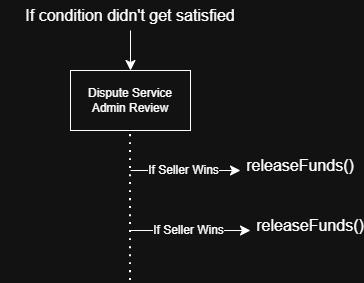
In a freelancing app, if a client is unhappy with the work, you can simply refund the money from escrow. But if the client goes directly to the bank and files a chargeback, the gateway will alert you, and you must provide proof, like chat logs or contracts.
In your system, you usually handle this using webhook alerts and storing all dispute details in your database, so nothing is lost.
Webhooks: Why Async Events Matter (The Messenger Pigeon)
Payments on the internet are not always instant. A user might click “Pay,” but the confirmation can take a few seconds or even minutes because banks and gateways are checking security and balances in the background.
A webhook is the payment gateway’s way of sending a message to your server automatically when something happens. Instead of you asking again and again, “Did the payment succeed yet?” the gateway tells you, “Yes, it worked,” or “No, it failed.”
This is important because constantly checking the gateway wastes time and server power. Webhooks are more efficient and closer to real-time updates.
Imagine ordering pizza. Instead of calling the shop every minute asking if it’s ready, the shop sends you a text saying, “Your pizza is out for delivery.” That’s exactly how a webhook works.
In a freelancing app, when a client pays through Khalti or PayPal, the gateway sends a webhook to your system. Your backend then updates the order status to “Paid,” sends a receipt email, and unlocks the service. For safety, you also verify special signatures to ensure that fake messages cannot trick your system
So in code, you create a special URL called endpoints that listen for those webhook events and react when payments succeed, fail, or get refunded.
Security Basics: Keeping the Vault Locked (PCI-DSS, Tokenization)
Payments mean sensitive data. If this data leaks even once, trust is gone, and the damage can be huge.
PCI-DSS is basically a big set of security rules made for anyone who handles card information. It tells companies to encrypt data, run audits, and follow strict safety practices. If you directly store card details yourself and don’t follow these rules, you can face heavy fines and legal trouble.
Tokenization is a safer approach. Instead of saving the real card number, you save a random string called a token. The payment gateway keeps the real card data securely on their side, and you only keep the token for future payments. So even if your database gets hacked, attackers only see useless random codes, not actual cards.
A simple way to think about tokenization is a secret nickname. Instead of saying the real card number, your system just says, “Use token ABC123.” The gateway understands it, but outsiders can’t do anything with it.
In e-commerce apps, this is how “one-click buy” works. Users save their cards, but you’re actually saving tokens, not real numbers. And for PCI-DSS, most startups just use certified gateways so they don’t have to manage all the strict compliance themselves.
One golden rule here: never store raw card details in your own database. Let the gateway handle that headache.
Actors in Payment: The Team Behind the Scenes
A payment is never handled by a single system. There’s a whole team working quietly in the background every time someone clicks “Pay.”
The Issuer is the buyer’s bank or card provider. They check if the user has enough balance and approve or reject the payment.
The Acquirer is the merchant’s bank, the one that finally receives the money and deposits it into your account.
The Gateway is the middle layer, like Khalti or PayPal. It securely sends payment information between everyone and makes sure things flow correctly.
The Network is the big connector, like Visa or Mastercard. They set the rules and infrastructure that allow cards to work worldwide.
You can imagine it like making a movie. The issuer is the one funding the script, the acquirer collects the ticket sales, the gateway is the directory managing the scenes, and the network is the studio that sets the standards and distribution.
So when a client pays with a card, the issuer first checks and approves it, the gateway sends the request through the network, the acquirer receives the funds, and after settlement, the money lands in your bank. It all happens in seconds, but there’s a full team involved every single time.
Let’s learn some high-level concepts:
Escrow: Money is held temporarily by a trusted system until conditions are met.
Example (Real Life):
- You buy a laptop from a stranger.
- You don’t trust the seller.
- The seller doesn’t trust you
- A middle person holds the money.
- When you receive the laptop, the money is released to the seller. An Escrow is like a middle person.
People might think Escrow is a bank feature because the money is being held by the banks, and the Payment gateways show “held balance.”
But the truth is, Escrow is called “logic, not a bank feature” because the real decision about when and to whom the money should be released is made by your application, not by the bank. A bank or payment gateway only knows how to store, send, and receive money. It does not understand whether a service was completed, whether a buyer is satisfied, or whether a dispute exists. Those decisions require business rules, and business rules live inside your backend code. That decision-making layer is what we call escrow logic.
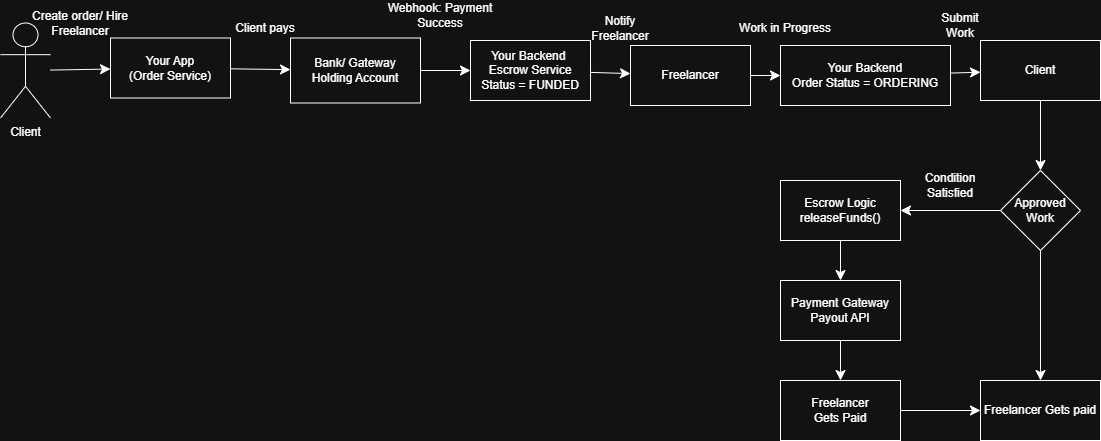
In production payment gateway integrations, escrow usually means that the client’s payment first goes into a platform holding account or an authorized but not yet captured state. The money is technically with the bank or gateway, but the control over its release is still in your system. Payment gateways provide tools like authorization holds, delayed capture, split payments, or scheduled payouts, but they do not automatically decide when to use them. Your backend must call those APIs at the correct time based on your business rules.
From a technical perspective, escrow behaves like a state machine inside your database and services. An order might move through states such as
Initiated → Funded → In Progress → Completed → Released or Refunded.
The bank does not track these states—your application does. When the state changes to “Completed and Approved,” your system then tells the gateway to release the money. This is why escrow is considered logic: it is about managing states and conditions, not just holding funds.
Understanding this difference is critical when building platforms like freelancing marketplaces or e-commerce systems. If you assume escrow is purely a bank feature, you lose flexibility and control over disputes, refunds, and timing. When you treat escrow as application logic, you gain full authority to design safer flows, better user experiences, and more reliable financial operations. In short, the bank moves the money, but your software decides its fate.
Wrapping Up: Your Payment Superpower
And that’s it, the core ideas of payment systems, made simple. From understanding who is paying whom to knowing the hidden players behind every transaction, you now have a clear picture of how things actually work. Payment gateways like Khalti or PayPal handle most of the heavy lifting; your role as a developer is mainly about connecting the pieces properly using APIs, webhooks, and clean business logic.
Let me know your insights in the comment section.
In simple terms, the bank acts like a wallet, while your application acts like a judge or manager. The wallet can hold money safely, but it does not decide who deserves it. Your system checks conditions such as “Is the order completed?”, “Did the client approve the work?”, or “Is there a dispute?” Based on these checks, your backend triggers actions like releasing funds to the seller or refunding the buyer. This conditional flow (if/else rules, approval flags, timers, dispute checks) is pure software logic, not a banking service.
