



Imagine you’re a developer at a huge company like Meta, working on something as massive as Facebook.
At the start, life is simple. You write code, push features, fix bugs. But as Facebook grows, so does the team. Suddenly, thousands of developers across the world are working on the same codebase at the same time.
Now here’s the catch.
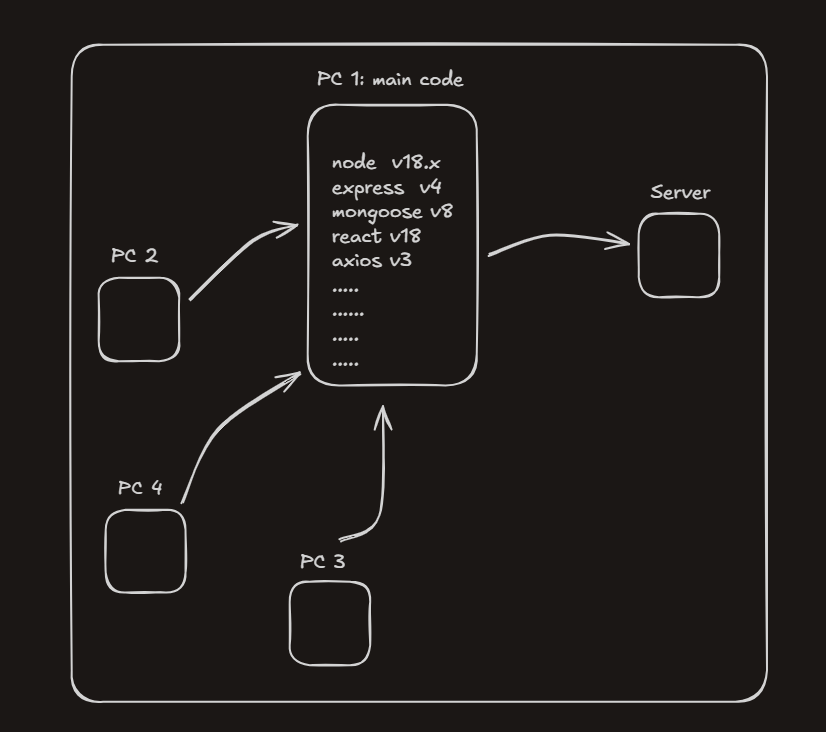
You’ve built Facebook using a MERN stack:
– Node.js v18
– Express v4
– MongoDB v8
– React v18
– Axios v3
– …and many more dependencies
Everything works perfectly on your machine.
But the moment another developer clones your repository, chaos begins.
“Which Node version are we using?”
“My app crashes on startup.”
“It works on your laptop but not on mine.”
Each developer now has to manually:
- Install the correct Node version
- Match exact library versions
- Configure environment variables
- Fix OS-specific issues
Now multiply this problem by hundreds or thousands of machines and dependencies.
– This is slow.
– This is error-prone.
– This does not scale.
How docker solves it?
Docker solves this problem by doing something beautifully simple.
Instead of saying:
“Hey, please install Node v18, Express v4, MongoDB v8, React v18…”
Docker says:
“Here. Take this box.”
That box (called a container) includes:
- Your application code
- All required dependencies
- Exact versions of tools
- Configuration files
- Runtime environment
Everything your app needs to run — packed together.
Now when another developer joins the team:
– They don’t install 10 things manually
– They don’t worry about versions
– They just run one command
And boom — the app runs exactly the same way as it does on your machine.
– No errors.
– No setup drama.
– No wasted hours.
Why This Matters at Scale
In large organizations:
– Developers join and leave frequently
– Teams work across different operating systems
– Applications move from laptops → staging → production servers
– Thousands of dependencies across hundreds of developer machines
Docker ensures:
– Same environment everywhere
– Faster onboarding
– Zero “works on my machine” bugs
– Massive time savings
And here’s the important part many beginners miss:
A server is also just a computer.
It’s basically like a teammate’s PC — except more powerful, faster, and sitting in a data center instead of on a desk. The same environment problems that happen on a developer’s laptop can happen on a server too.
Without Docker, deploying often means:
– Manually setting up software on the server
– Matching versions again
– Fixing bugs that only appear in production
With Docker, you don’t deploy code — you deploy the same container that already works.
Docker doesn’t care whether it’s running on:
– Your laptop
– Your teammate’s PC
– A production server with insane specs
If it runs in Docker, it runs anywhere.
The Big Picture
Docker isn’t just a tool.
It’s a standard way of shipping software.
– You write once.
– You package once.
– You run it everywhere.
That’s why modern companies rely on Docker — and why, sooner or later, every developer ends up learning it.
How Does Docker Do All of This?
So far we’ve said Docker magically makes everything work the same everywhere.
But how does it actually pull that off?
The answer is simple:
Docker does this using Docker containers.
What Are Docker Containers?
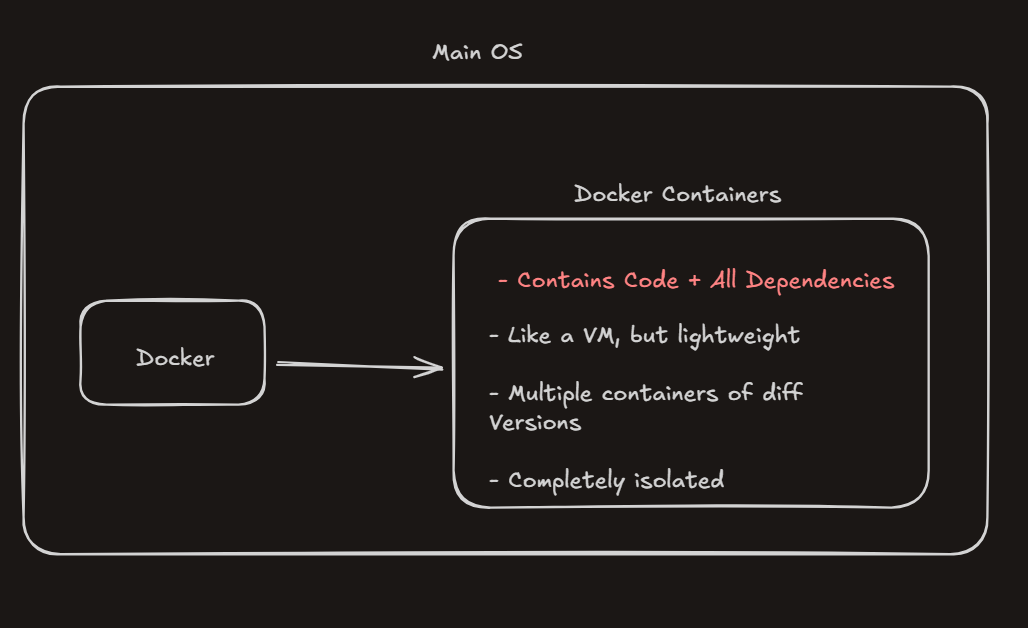
A Docker container is that box we’ve been talking about all along.
It’s where:
– Your application code lives
– All required dependencies are installed
– Exact versions are locked in
– Configuration stays consistent
Think of a container as a self-contained runtime for your app.
Once a container is created, whatever runs inside it behaves the same — no matter where it’s running.
“Is It Like a Virtual Machine?”
This is where many beginners get confused.
A Docker container is similar to a Virtual Machine, but it is not a VM.
A traditional VM:
– Runs a full operating system
– Includes its own kernel
– Is heavy and slow to start
A Docker container:
– Shares the host system’s OS kernel
– Does not run a full OS
– Starts in seconds
– Uses far fewer resources
So instead of virtualizing an entire computer, Docker only virtualizes what your application actually needs.
That’s why containers are called lightweight.
Multiple Containers, Multiple Versions
Another powerful feature of Docker containers is isolation.
You can run:
– One container with Node.js v18
– Another container with Node.js v16
– Another container with a completely different app
All on the same machine, at the same time.
– They don’t interfere with each other.
– They don’t clash.
– They don’t break your system.
Each container lives in its own isolated box.
Why Isolation Matters
Docker containers are completely isolated from your main operating system.
This means:
- Deleting a container won’t affect your OS
- Breaking an app inside a container won’t crash your machine
- Experimenting feels safe
For example, if you mess up a dependency inside a container, you don’t panic — you just delete the container and create a new one. Your laptop stays clean, untouched, and stable.
This isolation is what makes Docker perfect for:
– Development
– Testing
– Deployment
The Real Takeaway
Docker containers are not virtual machines — and that’s their biggest strength.
They give you:
– VM-like isolation
– Without VM-level heaviness
That’s how Docker gets its “superpowers” — by running applications inside lightweight, isolated containers that behave the same everywhere.
How Are Docker Containers Created?
By now, we know that containers are the heart of Docker.
They’re what give Docker its “superpower”.
So the obvious question is:
– How are these containers actually created?
This is where Docker Images come into the picture.
Docker Images: The Blueprint Behind Containers
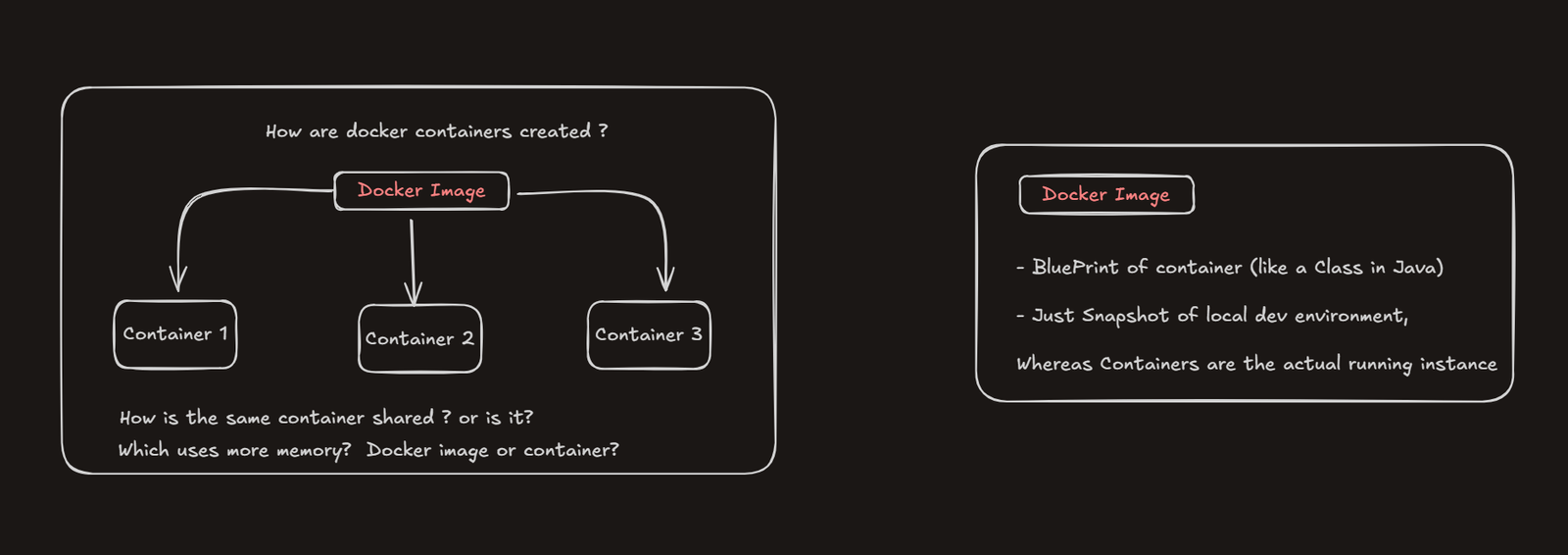
Docker containers are created using Docker images.
A Docker image is essentially a blueprint for a container. It defines:
- Which dependencies are needed
- Which versions should be installed
- How the application should run
In simple terms, a Docker image decides what a container should look like before it even exists.
You can create multiple containers from the same Docker image, and all of them will behave exactly the same.
If you’ve worked with Java or OOP, think of it this way:
– A Docker image is like a class
– A Docker container is like an object created from that class
You can create many objects from the same class — similarly, you can create many containers from the same image.
Image vs Container
A Docker image is just a snapshot of your local development environment.
– It’s not running.
– It’s just a packaged definition.
A Docker container, on the other hand, is the actual running instance created from that image.
That’s why:
– Docker images take less memory
– Most of the memory is used only when containers are created and running
You don’t run images — you run containers.
So How Does This Help Docker Run Everywhere?
Because the Docker image captures your app once, with all its dependencies and versions locked in.
When that image is used to create containers:
– The same app
– With the same setup
– Runs on laptops, PCs, and servers
That’s how Docker makes applications portable.
How Do We Share these Containers Across Machines?
One important thing to understand:
– We don’t share containers. We share Docker images.
Here’s the typical workflow (what a DevOps engineer usually does):
- Build the application with all required dependencies
- Capture a snapshot of the local development environment → this step creates a Docker image
- Share that Docker image with the team
- Each developer uses the same image to create their own container
And boom — everyone is now on the same page.
Every developer is running:
– The same application code
– The same dependency versions
– The same environment
No one is guessing.
No one is configuring things differently.
No one is debugging setup issues.
Which means:
– No manual dependency installation
– No version mismatches
– No “it works on my machine” problems
Everyone just pulls the image, spins up a container, and starts coding immediately.
– Straight to development.
– No wasted time.
– No unnecessary friction.
Conclusion
Docker exists to solve a very real problem: inconsistent environments.
By packaging applications into containers and creating them from reusable images, Docker makes sure the same code and dependencies run the same way everywhere — on developer machines, teammate PCs, and production servers.
Once you understand:
- Containers as isolated runtime environments
- Images as blueprints that create those containers
You’ve understood the core idea behind Docker.
Everything else — Dockerfiles, Docker Hub, Docker Compose — simply builds on this foundation.
