



Imagine you’re leading a team on a high-traffic e-commerce platform. Your API endpoints are humming along, converting Java objects to JSON for frontend consumption. Everything’s fine until a minor update to a model class causes deserialization failures across the board—sudden 500 errors, corrupted data in your database, or worse, a vulnerability that lets attackers inject malicious payloads. I’ve debugged these issues at 2 AM more times than I’d like to admit. Pain points like incompatible object versions between services, bloated payloads slowing down response times, or insecure deserialization exposing your app to remote code execution (think Log4Shell-level drama) are all too common. And in Spring Boot, where RESTful APIs are the norm, ignoring these can turn your “quick fix” into a full-scale refactor.
But don’t worry—I’m here to break it down in an easy, step-by-step way, just like I’d mentor a junior dev over coffee. We’ll start with the basics, dive into real-world contexts, and wrap up with practical examples you can try in your own Spring Boot project. By the end, you’ll see serialization and deserialization not as black magic, but as essential tools for robust, efficient systems.
What Are Serialization and Deserialization?
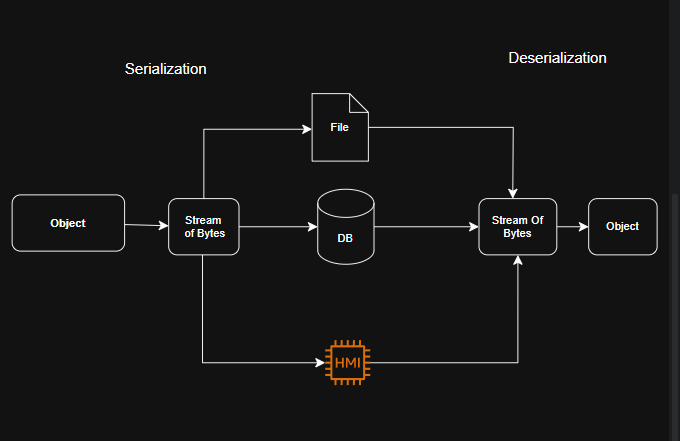
At its core, serialization is the process of converting a Java object (with all its properties and state) into a format that can be easily stored or transmitted. Think of it like packing a suitcase: You take your complex outfit (the object) and fold it into a compact form (like a byte stream, JSON, or XML) for travel.
Deserialization, on the other hand, is unpacking that suitcase—reconstructing the original object from the serialized format so your code can work with it again.
Why does this matter in Spring Boot? Spring Boot excels at building REST APIs, where data constantly moves between clients (like web browsers or mobile apps) and your server. Without serialization, you couldn’t send a User object as JSON over HTTP. Without deserialization, you couldn’t turn incoming JSON back into a usable User instance to process in your controllers or services.
In real-world terms:
- Serialization happens when your API responds to a GET request, turning a database entity into JSON for the client.
- Deserialization kicks in on POST/PUT requests, where the client sends JSON, and Spring Boot magically converts it to a Java object for your endpoint to handle.
Spring Boot handles much of this automatically via libraries like Jackson (the default JSON processor), but understanding the mechanics lets you customize, optimize, and secure it.
Common Pain Points in the Real World (And How They Sneak Up on You)
Before we get to the good stuff, let’s revisit those pain points with context:
- Security Risks: Deserialization can be a hacker’s playground. If you’re not careful, malicious input can lead to arbitrary code execution. Remember the 2017 Equifax breach? It stemmed from a deserialization flaw in Apache Struts. In Spring Boot, using default settings without validation can expose you similarly.
- Performance Hits: Serializing large objects or graphs with cycles (e.g., a Department object referencing Employees that reference back to Department) can cause stack overflows or massive payloads, slowing your API to a crawl—especially in high-load scenarios like Black Friday sales.
- Versioning Nightmares: Microservices evolve independently. If Service A serializes a Product object with a new field, but Service B deserializes it without knowing, boom—exceptions everywhere. I’ve seen teams waste weeks on this in distributed systems.
- Format Mismatches: Not all clients speak JSON. What if you need XML for legacy integrations? Or binary formats for IoT devices? Default setups might fail silently.
- Data Loss or Corruption: Transient fields (like passwords) might not serialize properly, leading to incomplete objects post-deserialization.
The key takeaway? These aren’t theoretical—they hit when your app scales or integrates with the outside world.
How It Works in Spring Boot?
Spring Boot uses the @RestController annotation to wire up serialization/deserialization seamlessly. Under the hood:
- Jackson (via spring-boot-starter-web) handles JSON by default.
- You can customize with annotations like @JsonIgnore to skip fields or @JsonFormat for dates.
But let’s make it concrete with real-world examples.
a. JSON Serialization/Deserialization with Jackson
- Serialization happens when Spring Boot converts an object into JSON to send it as an HTTP response.
- Deserialization happens when Spring Boot reads an HTTP request body (in JSON format) and converts it to a Java object.
public class EmployeeController {
@PostMapping(“/employee”)
public ResponseEntity<Employee> createEmployee(@RequestBody Employee employee) {
// The incoming JSON data is deserialized into the Employee object
// Further logic goes here…
return ResponseEntity.ok(employee);
}
@GetMapping(“/employee/{id}”)
public ResponseEntity<Employee> getEmployee(@PathVariable Long id) {
Employee employee = new Employee(id, “John Doe”, “Engineering”, 50000);
// The Employee object will be serialized to JSON in the HTTP response
return ResponseEntity.ok(employee);
}
}
- The
@RequestBodyannotation triggers deserialization, allowing JSON data from the request to be converted to theEmployeeobject. - The
ResponseEntity.ok(employee)statement serializes theEmployeeobject to JSON before sending it as a response.
b. Customizing Serialization/Deserialization
@JsonProperty: Customize field names in JSON.@JsonIgnore: Exclude fields from serialization/deserialization.@JsonInclude: Include fields conditionally based on non-null, non-empty, etc.
Here, the id field will be serialized with the name employee_id, and the department field will be ignored during serialization.
public class Employee {
@JsonProperty(“employee_id”)
private Long id;
@JsonIgnore
private String department;
// other fields, getters, and setters
}
