



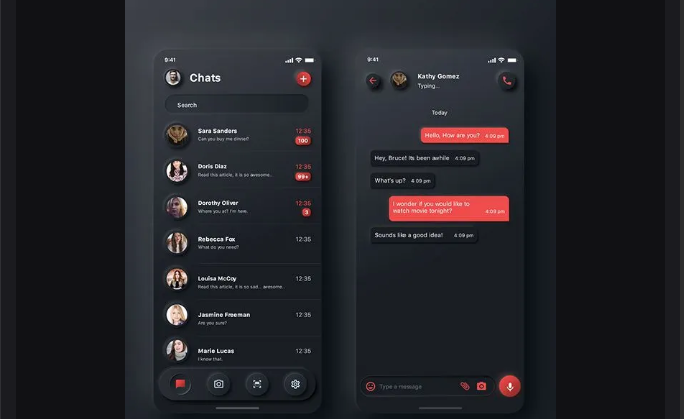
In recent years, software has evolved a lot, and adding a chat feature is like putting a cherry on top of a cake. It doesn’t just add functionality; it makes your system feel more alive and connected. When I first started researching how to build a chat system, I found that most blogs and tutorials were either incomplete or too vague. So, I rolled up my sleeves, built my own version, and now I’m sharing the process with you.
Simple Workflow Illustration:
User sends message → Save to database → Put in Redis queue → Another service picks it up and delivers it
Why Not Just HTTP?
Traditional HTTP works great for simple request–response interactions. But the moment you need real-time, two-way communication, HTTP falls short. That’s where WebSocket comes into play. In this guide, we’ll be building a chat system that supports private one-to-one messaging. And don’t worry, messages won’t disappear even if the receiver is offline. Tools that we are going to use here:
- WebSocket is a communication protocol that enables two-way interaction over a single TCP connection. Unlike HTTP, which is request–response only, WebSocket stays open and allows the server to push messages instantly. Think of it as the backbone of our real-time messaging system. Imagine two people talking through walkie-talkies. Once the line is open, both can talk anytime.
- But… when someone speaks, the other person only hears the raw message: “Hello there!”
- That’s WebSocket. Fast, direct, but with no extra information. You don’t know who sent the message unless you figure it out yourself.
- STOMP (Simple Text Oriented Messaging Protocol) adds a layer on top of WebSocket, making it easier to send messages with metadata. Instead of dealing with raw low-level WebSocket messages, STOMP gives structure and clarity. Now imagine the same walkie-talkie, but every message comes in an envelope with details:
- Sender: Dipesh
- Receiver: Abhishek
- Message: “Hello there!”
- Time: 10:32 AM
That’s STOMP on top of WebSocket. WebSocket is still the channel (the walkie-talkie line). STOMP adds the structure (the envelope with metadata). This makes it much easier to handle things like chat rooms, private messages, or delivery confirmation.
Redis Pub/Sub:
Redis Pub/Sub with WebSocket leverages Redis in-memory speed and publish subscribe model for real-time messaging, paired with WebSocket for bi-directional client-server communication.
Redis Streams : It ensures that messages reach to the next person even the person is offline. It stores the message on backup and send it when the person come back online.
Redis Lettuce Client: Lettuces is a Java Redis Client (async, reactive and scalable). In our system you do not use Lettuce Directly, instead Spring data Redis uses Lettuce under the hood. But when we deal with streams, we often use Lettuce APIs (because they are lower-level and powerful)
PostgreSQL: While Redis handles speed and real-time delivery, PostgreSQL ensures your messages are safely stored for the long run. This way, even if someone logs in tomorrow, their conversation history is still there. STOMP is alike a HTTP , it works over TCP using the following commands: CONNECT SUBSCRIBE UNSUBSCRIBE SEND COMMIT ACK Chat System Architecture:
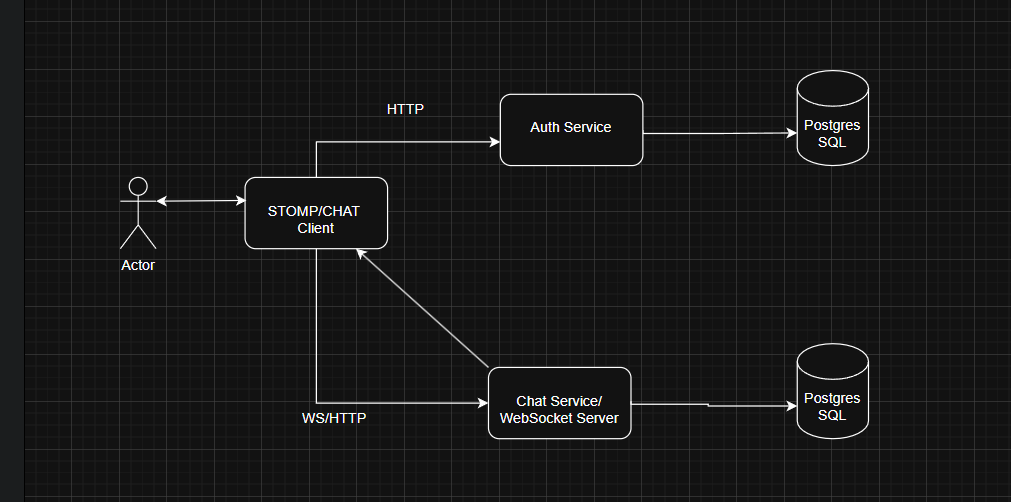
Auth Service: We have implement JWT Authentication to ensure the security of the users. Here, we are not going to rotate the wheel again you can check it from my GitHub repository. Soon we will make dedicated content for Auth Service. https://github.com/dipeshghimire2004/khet-bari-backend/tree/dev/src/main/java/org/khetbari/features/auth Chat Service : Chat service is responsible for configuring the WebSocket and enabling STOMP message handling and, persisting and handling user messages. Now lets dive into the implementation part of the system. Lets start with database model: ChatMessage.java:@Entity@Table(name = "chat_messages", indexes = {@Index(name = "idx_chat_room_created_at", columnList = "chat_room_id, created_at"),@Index(name = "idx_sender_created_at", columnList = "sender_id, created_at")})@Getter@Setter@NoArgsConstructor@AllArgsConstructor@DynamicInsert@DynamicUpdate@Builder@EqualsAndHashCode(callSuper = true)public class ChatMessage extends UUIDBaseEntity {@ManyToOne(fetch = FetchType.LAZY)@JoinColumn(name = "conversation_id")private Conversation conversation;@ManyToOne(fetch = FetchType.LAZY)@JoinColumn(name = "sender_id", nullable = false)private UserModel sender;@Column(name = "content", nullable = false, length = 5000)private String content;@Enumerated(EnumType.STRING)@Column(name = "message_type", nullable = false)@Builder.Defaultprivate MessageType messageType = MessageType.TEXT;@Enumerated(EnumType.STRING)@Column(name = "message_status", nullable = false)@Builder.Defaultprivate MessageStatus messageStatus = MessageStatus.SENT;//Message lifecycle timestamps@Column(name="sent_at", nullable = false)private LocalDateTime sentAt;@Column(name="delivered_at")private LocalDateTime deliveredAt;@Column(name="read_at")private LocalDateTime readAt;@Column(name = "is_edited", nullable = false)@Builder.Defaultprivate Boolean isEdited = false;@Column(name = "edited_at")private LocalDateTime editedAt;}Conversation.java:@Getter@Setter@Entity@Table(name = "conversation",uniqueConstraints = @UniqueConstraint(columnNames = {"participant_one_id", "participant_two_id"}),indexes = {@Index(name = "idx_conversation_participant_one", columnList = "participant_one_id"),@Index(name = "idx_conversation_participant_two", columnList = "participant_two_id"),@Index(name = "idx_conversation_last_activity", columnList = "last_activity_at")})@EqualsAndHashCode(callSuper = true)public class Conversation extends UUIDBaseEntity {@ManyToOne(fetch = FetchType.LAZY)@JoinColumn(name = "participant_one_id", nullable = false)private UserModel participantOne; // Always the user with smaller ID (for consistency)@ManyToOne(fetch = FetchType.LAZY)@JoinColumn(name = "participant_two_id", nullable = false)private UserModel participantTwo;@OneToOne(fetch = FetchType.LAZY)@JoinColumn(name = "last_message_id")private ChatMessage lastMessage;@Column(name = "last_activity_at")private LocalDateTime lastActivityAt;}UserConversationStatus.java: We are simulating the message status, Just like facebook, instagram and whatsapp, where you can see when the message is sent, is it mark as read or not, and the number of unread messages. @Entity@Table(name="user_conversation_status",uniqueConstraints= @UniqueConstraint(columnNames ={"conversation_id", "user_id"}),indexes= {@Index(name="idx_user_conv_status_user", columnList="user_id"),@Index(name="idx_user_conv_unread", columnList="user_id, unread_count")})@Builder@AllArgsConstructor@NoArgsConstructor@Setter@Getter@DynamicInsert@DynamicUpdatepublic class UserConversationStatus extends UUIDBaseEntity {@ManyToOne(fetch = FetchType.LAZY)@JoinColumn(name = "conversation_id", nullable = false)private Conversation conversation;@ManyToOne(fetch = FetchType.LAZY)@JoinColumn(name = "user_id", nullable = false)private UserModel user;@ManyToOne(fetch = FetchType.LAZY)@JoinColumn(name = "last_read_message_id")private ChatMessage lastReadMessage;@Column(name = "unread_count", nullable = false)@Builder.Defaultprivate Integer unreadCount = 0;@Column(name = "is_archived", nullable = false)@Builder.Defaultprivate Boolean isArchived = false;@Column(name = "is_muted", nullable = false)@Builder.Defaultprivate Boolean isMuted = false;@Column(name = "joined_at", nullable = false)private LocalDateTime joinedAt;@Column(name = "last_read_at")private LocalDateTime lastReadAt;}
DTO and mapping part becomes a bit lengthy so I have mentioned a Github Link “https://github.com/dipeshghimire2004/spacechat-backend/tree/main/src/main/java/org/cognifybackend/spacechat/features/chat” Please visit and come back to follow the tutorial. Allright Guys, It seems like you’re quite enthusiasts to learnt the chat system. I have implement it in a scalable format by choosing a best tools for production. So even you are planning to lunch your system with chat features as a start up you are good to go after this tutorial . Now begin the actual things that, the features that enables you to chat on real time.
Redis is a message broker.
We are using Redis as a message broker at it allows us to send messages through channel or topics as well as receive from another consumer side. Lets configure Redis and Lettuce Client for chat system. Visit this link to know about Redis in detail
” https://medium.com/shoutloudz/redis-as-a-message-broker-d1a1aeac23c3“
Why Redis Stream for a chat System instead of Pub/Sub? Pub/Sub loses messages if no subscriber is listening. Streams persist message until consumed, ensuring delivery even if the receiver is offline. a. Guarantees message delivery even if the receiver is offline b. Built-in persistent (messages are stored until acknowledged) c. Supports consumer group for horizontal scaling, so it is perfect for real time messaging. Why Lettuce Over Jedis Client? Lettuce is netty-based, meaning a single connection can handle many concurrent requests using async/reactive APIs. a. Async/non-blocking operations (better performance) b. Built-in Connection Pooling and better integration with Spring Boot. c. Thread safe ( jedis required connection pooling) package org.cognifybackend.spacechat.common.config;import lombok.extern.slf4j.Slf4j;import org.springframework.beans.factory.annotation.Value;import org.springframework.context.annotation.Bean;import org.springframework.context.annotation.Configuration;import org.springframework.data.redis.connection.RedisStandaloneConfiguration;import org.springframework.data.redis.connection.lettuce.LettuceClientConfiguration;import org.springframework.data.redis.connection.lettuce.LettuceConnectionFactory;import org.springframework.data.redis.core.RedisTemplate;import org.springframework.data.redis.core.StreamOperations;import org.springframework.data.redis.repository.configuration.EnableRedisRepositories;import org.springframework.data.redis.serializer.GenericJackson2JsonRedisSerializer;import org.springframework.data.redis.serializer.StringRedisSerializer;import java.time.Duration;@Configuration@EnableRedisRepositories@Slf4jpublic class RedisConfig {@Value("${spring.redis.host:localhost}")private String redisHost;@Value("${spring.data.redis.port:6379}")private int redisPort;@Value("${redis.password}")private String redisPassword;@Value("${spring.data.redis.database}")private int redisDatabase;@Value("${spring.data.redis.timeout:5000}")private int redisTimeout;@Beanpublic LettuceConnectionFactory redisConnectionFactory() {log.info("Configuring redis connection {}:{}", redisHost, redisPort);RedisStandaloneConfiguration redisConfig = new RedisStandaloneConfiguration();redisConfig.setHostName(redisHost);redisConfig.setPort(redisPort);redisConfig.setPassword(redisPassword);redisConfig.setDatabase(redisDatabase);if(!redisPassword.isEmpty()) {redisConfig.setPassword(redisPassword);}LettuceClientConfiguration clientConfig = LettuceClientConfiguration.builder().commandTimeout(Duration.ofSeconds(redisTimeout)).build();LettuceConnectionFactory factory = new LettuceConnectionFactory(redisConfig, clientConfig);return factory;}//configure connection pool setting for optimal performance// why connection pooling?// Reuses connections to avoid connections overhead.// -Limits concurrent connection to prevent redis overload// handle connection lifecycle automatically.// private GenericObjectPoolConfig<LettuceConnection> getPoolConfig(){// GenericeObjectPoolConfig<LettuceConnection> config = new GenericObjectO// }// Configure redis template for redis operation// Why redis template?// Provide high level redis operations (get, set, stream operations)// handle serialization/ deserialization automatically// manage connection lifecycle// Serialization Strategy// StringRedsSerializer for keys (human readable in redis CLI)// GenericJackson2JsonRedisSerializer for values (handles complex objects)// Query may evolved in your mind:// Why not use spring data Redis Repositories?// ans: We need fined grained control over redis stream operations, which are not well supported by spring data redis repositories.@Beanpublic RedisTemplate<String, Object> redisTemplate(LettuceConnectionFactory connectionFactory) {log.info("Configuring Redis template with JSON serialization");RedisTemplate<String, Object> template = new RedisTemplate<>();template.setConnectionFactory(connectionFactory);//configure serializerStringRedisSerializer stringSerializer = new StringRedisSerializer();GenericJackson2JsonRedisSerializer jsonRedisSerializer = new GenericJackson2JsonRedisSerializer();//key serialization (using string for readability)template.setKeySerializer(stringSerializer);template.setHashKeySerializer(stringSerializer);//value serialization (use JSON for complex objects)template.setValueSerializer(jsonRedisSerializer);template.setHashValueSerializer(jsonRedisSerializer);template.afterPropertiesSet();return template;}//configure stream operations for redis streams specifically//why separate stream operation?//Specialized interface for redis stream client//type safe operations for streams data//Better performance than generic RedisTemplate for streams//Question that may aris in your mind: What's the difference between redis streamOperations and RedisTemplate?// ans: StreamOperations provide streams specific method like XADD, XREAD, while RedisTemplate is generic. StreamOperations is more efficient in a chat system.@Beanpublic StreamOperations<String, Object, Object> streamOperation(RedisTemplate<String, Object> redisTemplate) {log.info("Configuring stream operations");return redisTemplate.opsForStream();}}Lets move to configure RedisStreamsConfig.java: package org.cognifybackend.spacechat.common.config; //put your own package nameimport jakarta.annotation.PostConstruct;import lombok.RequiredArgsConstructor;import lombok.extern.slf4j.Slf4j;import org.springframework.data.redis.connection.stream.ReadOffset;import org.springframework.data.redis.connection.stream.StreamInfo;import org.springframework.data.redis.core.StreamOperations;import org.springframework.stereotype.Component;import java.util.HashMap;import java.util.Map;/*** Purpose: Configure Redis Streams for chat messaging** Redis Streams Concepts:* - Stream: Like a log of messages (e.g., "chat:messages")* - Consumer Group: Group of consumers that share message processing* - Consumer: Individual instance that processes messages** Why Consumer Groups:* - Load balancing: Multiple app instances can process messages* - Reliability: Unacknowledged messages can be reassigned* - Scalability: Add more consumers to handle increased load*/@Component@Slf4j@RequiredArgsConstructorpublic class RedisStreamsConfig {private final StreamOperations<String, Object, Object> streamOperations;//streams operation for different message typespublic static final String CHAT_MESSAGE_STREAM= "chat:messages"; // actual chat messages.public static final String MESSAGE_STATUS_STREAM = "chat:message-status"; // delivery receipts (delivered/read).public static final String USER_PRESENCE_STREAM = "chat:user-presence"; // online/offline status.//Chat consumer grouppublic static final String CHAT_CONSUMER_GROUP = "chat:processor";public static final String STATUS_CONSUMER_GROUP = "status:processor";public static final String PRESENCE_CONSUMER_GROUP = "presence:processor";@PostConstructpublic void initializeStreams(){log.info("Initializing Redis Streams for chat system");try{//initialize chat message streamsinitializeStream(CHAT_MESSAGE_STREAM, CHAT_CONSUMER_GROUP);//initializes message status stream (for delivery receiptsinitializeStream(MESSAGE_STATUS_STREAM, STATUS_CONSUMER_GROUP);//initialize user presence stream( for online/offline status)initializeStream(USER_PRESENCE_STREAM, PRESENCE_CONSUMER_GROUP);}catch(Exception e){log.error("Failed to initialize Redis Streams for chat system", e);throw new RuntimeException("Redis Streams initialization failed", e);}}//Purpose : Initialize a single stream with its consumer group//Implementation details:// creates stream by adding a dummy message if needed//creates consumer group from stream beginning// Handles BUSYGROUP error when group already exists// Error handling strategy// BUSYGROUP error is expected and ignored (group exists)// other errors are propagated to callerprivate void initializeStream(String streamKey, String consumerGroup) {try {// Check if stream exists by trying to get infotry {streamOperations.info(streamKey);log.debug("Stream {} already exists", streamKey);} catch (Exception e) {// Stream doesn't exist, create it with a dummy messagelog.info("Creating new stream: {}", streamKey);Map<String, Object> initialMessage = Map.of("type", "SYSTEM","message", "Stream initialized","timestamp", System.currentTimeMillis());streamOperations.add(streamKey, initialMessage);}// Create consumer group (start from beginning of stream)try {streamOperations.createGroup(streamKey, ReadOffset.from("0"), consumerGroup);log.info("Created consumer group {} for stream {}", consumerGroup, streamKey);} catch (Exception e) {// BUSYGROUP error means group already exists - this is OKif (e.getMessage().contains("BUSYGROUP")) {log.debug("Consumer group {} already exists for stream {}", consumerGroup, streamKey);} else {throw e;}}} catch (Exception e) {log.error("Failed to initialize stream {} with consumer group {}", streamKey, consumerGroup, e);throw e;}}/*** Purpose: Get stream statistics for monitoring** Why monitoring streams:* - Track message processing performance* - Identify bottlenecks or failed consumers* - Monitor stream length for capacity planning** Returns information like:* - Stream length (total messages)* - Consumer group count* - Last generated ID** Correct XInfoStream method names:* - streamLength() instead of getLength()* - lastGeneratedId() instead of getLastGeneratedId()* - groupCount() instead of getGroups()*/public Map<String, Object> getStreamInfo(String streamKey) {try {StreamInfo.XInfoStream info = streamOperations.info(streamKey);Map<String, Object> streamInfo = new HashMap<>();streamInfo.put("length", info.streamLength());streamInfo.put("lastGeneratedId", info.lastGeneratedId());streamInfo.put("radixTreeKeys", info.radixTreeKeySize());streamInfo.put("radixTreeNodes", info.radixTreeNodesSize());streamInfo.put("groups", info.groupCount());// Add first and last entry info if availableif (info.getFirstEntry() != null) {streamInfo.put("firstEntryId", info.firstEntryId());}if (info.getLastEntry() != null) {streamInfo.put("lastEntryId", info.lastEntryId());}return streamInfo;} catch (Exception e) {log.warn("Could not get info for stream {}: {}", streamKey, e.getMessage());return Map.of("error", e.getMessage());}}/*** Purpose: Clean up old messages from streams to prevent unbounded growth** Why stream trimming:* - Prevents Redis memory exhaustion* - Maintains performance (smaller streams = faster operations)* - Removes processed messages that are no longer needed** Trimming Strategy:* - Keep last 10,000 messages per stream* - Run periodically (e.g., daily via scheduled task)* - Use MAXLEN with ~ for approximate trimming (better performance)** @param streamKey The stream to trim* @param maxLength Maximum number of messages to retain*/public void trimStream(String streamKey, long maxLength) {try {long trimmed = streamOperations.trim(streamKey, maxLength, true); // true = approximatelog.info("Trimmed {} messages from stream {}, kept last {}",trimmed, streamKey, maxLength);} catch (Exception e) {log.error("Failed to trim stream {}: {}", streamKey, e.getMessage());}}}
In above program you can see that
Key concepts in Simple Words
Stream -> Like a chat room log where every message is stored (chat:messages). Consumer Group – A team of workers that share the job of processing messages. Consumer -> A single worker inside that team. This setup helps with: Load balancing -> Many app instances share the work Reliability -> If one worker crashes, another can process its messages. Scalability -> Just add more consumers if traffic increases.
- On App Startup (@PostConstruct):
It check if the streams (chat: messages, chat:message-status, chat:user-presence) exist. If not, it creates them with a dummy message (Stream initialized). Then, it makes consumer groups for each stream (e.g.,”chat-processors”). So when your app start, you always have streams + groups ready. 2. InitializeStream Method: Tries to find the stream. If it doesn’t exist -> create it with a fake “system” message. Then tries to create a consumer group starting from the beginning of the stream. If the group already exists -> no proble ignore the error. 3. Get Stream info Method: Lets you check stats about a stream: Total messages(length), Last message Id, Number of Groups, First and last entry IDs (useful for monitoring and debugging.) 4. Trim Stream Method : Keeps only the last 10, 000 messages (or however many you set). prevents Redis from filling up forever with old data. Runs occasionally to save memory. Then we can start to write the logic how messages will be send and its different status are stored in Redis Stream
Feature 6: Message Publisher
What is a Message Publisher?
Think of it like you send a letter to your belonging and send it , clerk at the post Office accepts it (publisher accept the messages). Then clerk sort it into the right mailbox (Publisher pushes the messages into the correct Redis Stream. Receiver checks the mailbox, watch it and react. E.g. Suppose Dipesh send message to Deepika, Dipesh: Hey! Deepika. Redis Publisher accept the message and put it into the channel stream "chat:dipesh-deepika" (path). Then Deepika opens the chat app she saw the message of Dipesh.Publishes Chat messages to Redis Stream for real-time deliveryWhy publisher pattern:Decouples message creation from deliveryEnables async processing (better performance)support multiple consumers (help in scaling)Provides reliability through redis stream persistenceDesign Pattern : Producer-Consumer with redis streamsProducers: This service publishes message to streamsConsumers: Message processor service consumes and handle messagesStream: Act as a reliable message queueQuestion that may arise:Why not directly send via a websocket?Redis stream provides reliability. If websocket is disconnected, messages are queued and delivered when user reconnects.Purpose: Publish a new chat message to Redis streammessage workflow:User send message via REST/WebSocketMessage saved to postgresSQL (reliability)Message published to redis stream (real time delivery)Consumers process from streams and sends via websocketWhy this approach?Database ensures message persistenceRedis streams enables real time delivery.If redis fails, messages will be saved to database
Now lets learn how our message got published to the redis stream:
@Service@Slf4j@RequiredArgsConstructorpublic class MessagePublisherService {private final StreamOperations<String, Object, Object> streamOperations;private final ObjectMapper objectMapper;// Inject stream names from configurationprivate static final String CHAT_MESSAGES_STREAM = RedisStreamsConfig.CHAT_MESSAGES_STREAM;private static final String MESSAGE_STATUS_STREAM = RedisStreamsConfig.MESSAGE_STATUS_STREAM;private static final String USER_PRESENCE_STREAM = RedisStreamsConfig.USER_PRESENCE_STREAM;/*** Purpose: Broadcast a new chat message to anyone who's listening** Simple Process:* 1. User sends "Hello!" to their friend* 2. Message gets saved to database first (permanent storage)* 3. This method "broadcasts" the message on Redis (immediate delivery)* 4. Other parts of our app are "listening" to this broadcast* 5. If the friend is online, they get the message instantly via WebSocket** @param message - The chat message that was just saved to database* @return String - A unique ID that Redis gives us (for tracking)*/// Question that may arise: What if Redis is down?// ans: messages still saved on database. We can implement fallback to pulled-based messaging or batch processingpublic String publishChatMessage(ChatMessage message) {try{log.info("Publishing chat message {} to redis stream", message.getId());//Create a "package" of information about this messageMap<String, Object> messagePackage= createMessagePackage(message);//add messages to stream with automatic id generation, Put the package on our "chat message radio channel"RecordId recordId= streamOperations.add(CHAT_MESSAGES_STREAM,messagePackage);log.info("Published chat message {} to redis stream with ID:{}", message.getId(), recordId);return recordId.getValue();}catch(Exception e){log.error("Failed to publish chat message {} to redis streams.",message.getId(), e);// Important: Even if broadcasting fails, the message is still saved in database// So users can still see it when they refresh the pagereturn null;}}/*** Purpose: Create a "package" of information about the message** Think of this like creating a shipping label with all important info:* - Who sent it* - Who should receive it* - What the message says* - When it was sent* - Any other important details** @param message - The original message from database* @return Map - A "package" with all the important information*/private Map<String, Object> createMessagePackage(ChatMessage message) {return Map.of("messageType", "CHAT_MESSAGE","messageId", message.getId().toString(),"conversationId", message.getConversation().getId(),"senderId", message.getSender().getId().toString(),"receiverId", message.getReceiver().getId().toString(),"senderName", message.getSender().getFullName(),"content", message.getContent(),"status", message.getMessageStatus().toString(),"sentAt", message.getSentAt().toString(),"timestamp", System.currentTimeMillis());}/*** Purpose: Broadcast when message status changes (like "delivered" or "read")** Simple Example:* 1. Dipesh sends "Hi" to Tamanna* 2. Tamanna opens the chat app (message becomes "delivered")* 3. This method broadcasts "Hey everyone, Tamanna got Dipesh's message!"* 4. Dipesh's app receives this update and shows a "delivered" checkmark** @param messageId - Which message changed status* @param newStatus - What the new status is (DELIVERED or READ)* @param userId - Who caused this status change* @return String - Broadcast ID for tracking*/public String publishMessageStatus(UUID messageId, MessageStatus newStatus, UUID userId) {try{log.info("Publishing status update message {} to status: {}", messageId, newStatus);Map<String, Object> statusData= Map.of("messageType", "STATUS_UPDATE","messageId", messageId.toString(),"newStatus", newStatus.toString(),"updatedBy", userId.toString(),"timeStamp", System.currentTimeMillis());//BroadCast on the "status updates channel"RecordId recordId= streamOperations.add(MESSAGE_STATUS_STREAM,statusData);log.info("Published status update message {} to status: {}", messageId, newStatus);return recordId.getValue();}catch(Exception e){log.error("Failed to publish message status update for message: {}", messageId, e);return null;}}/*** Purpose: Broadcast when user comes online or goes offline** Simple Example:* 1. Tamanna opens the chat app (she comes online)* 2. This method broadcasts "Tamanna is now online!"* 3. Anyone chatting with Tamanna can see she's online* 4. When Tamanna closes the app, we broadcast "Tamanna is now offline"** @param userId - Which user's status changed* @param isOnline - Are they online or offline now?* @param sessionId - Their connection ID (can be null)* @return String - Broadcast ID for tracking*/public String publishPresenceUpdate(UUID userId, boolean isOnline, String sessionId){try {log.info("Publishing presence update for user {}: online:{}", userId, isOnline);Map<String, Object> presenceData = Map.of("messageType", "PRESENCE_UPDATE","userId", userId.toString(),"isOnline", isOnline,"sessionId", sessionId != null ? sessionId : "","timeStamp", System.currentTimeMillis());RecordId recordId= streamOperations.add(USER_PRESENCE_STREAM,presenceData);log.info("Published presence update for user {}: with streamsID :{}", userId, recordId.getValue());return recordId.getValue();}catch(Exception e){log.error("Failed to publish presence update for user {}: ", userId, e);return null;}}/*** Purpose: Broadcast typing indicators (like "John is typing...")** Simple Example:* 1. Dipesh starts typing a message to Tamanna* 2. This method broadcasts "Dipesh is typing in conversation XYZ"* 3. Tamanna's app shows "Dipesh is typing..." indicator* 4. When Dipesh stops typing, we broadcast "Dipesh stopped typing"** @param conversationId - Which conversation* @param userId - Who is typing* @param isTyping - Started typing (true) or stopped typing (false)* @return String - Broadcast ID for tracking*/// * Implementation Note:// * Typing indicators should be published to main chat stream with// * special message type to keep processing simple.// */public String publishTypingIndicator(UUID conversationId, UUID userId, boolean isTyping) {try{log.info("Publishing typing indicator");Map<String, Object> typingData = Map.of("messageType", "TYPING_INDICATOR","userId", userId.toString(),"conversationId", conversationId.toString(),"isTyping", isTyping,"timeStamp", System.currentTimeMillis());RecordId recordId= streamOperations.add(CHAT_MESSAGES_STREAM,typingData);log.info("Published typing status update for user {}: with streamsID :{}", userId, recordId.getValue());return recordId.getValue();}catch(Exception e){// Typing indicators are not critical - if they fail, it's not a big deallog.error("Failed to publish typing indicator for message: {}", conversationId, e);return null;}}/*** Purpose: Send multiple messages at once (batch broadcasting)** When would we use this?* - When someone comes back online and has 10 unread messages* - When importing old messages* - When syncing messages between devices** @param messages - List of messages to broadcast* @return Map - Shows which messages were successfully broadcasted** Cross-Question: When would you use bulk publishing?* Answer: When user comes back online and has multiple offline messages,* or during data migration/synchronization scenarios.*/public Map<UUID, String> bulkPublishChatMessages(List<ChatMessage> messages) {Map<UUID, String> result = new HashMap<>();if(messages.isEmpty()) return result;try{log.info("Publishing chat message {} to redis stream", messages.size());for(ChatMessage message : messages){String recordId = publishChatMessage(message);result.put(message.getId(), recordId);}log.info("Published chat message {} to redis stream", messages.size());}catch(Exception e){log.error("Failed to publish chat message {} to redis stream", messages.size(), e);return null;}return result;}/*** Purpose: Get information about our broadcasting system (for monitoring)** This helps us answer questions like:* - How many messages are waiting to be processed?* - Is our broadcasting system working well?* - Are there any bottlenecks?** @return Map - Statistics about our broadcasting system*/public Map<String, Object> getPublisherStatistics() {Map<String, Object> stats = new HashMap<>();try {// Get info for each streamstats.put("chatStream", getChannelStats(CHAT_MESSAGES_STREAM));stats.put("statusStream", getChannelStats(MESSAGE_STATUS_STREAM));stats.put("presenceStream", getChannelStats(USER_PRESENCE_STREAM));} catch (Exception e) {log.error("Failed to get publisher statistics", e);stats.put("error", e.getMessage());}return stats;}/*** Purpose: Get statistics for one specific "radio channel"** @param channelName - Which channel to check* @return Map - Statistics about that channel*/private Map<String, Object> getChannelStats(String channelName) {try {StreamInfo.XInfoStream info = streamOperations.info(channelName);// Extract the important numbers in simple termsMap<String, Object> stats = new HashMap<>();stats.put("totalMessages", info.streamLength()); // How many messages in totalstats.put("lastMessageId", info.lastGeneratedId()); // ID of the most recent messagestats.put("consumerGroups", info.groupCount()); // How many groups are listening// Add more detailed info if availableif (info.getFirstEntry() != null) {stats.put("firstMessageId", info.firstEntryId()); // ID of the oldest message}if (info.getLastEntry() != null) {stats.put("latestMessageId", info.lastEntryId()); // ID of the newest message}return stats;} catch (Exception e) {return Map.of("error", e.getMessage());}}}
Summary: Our messagPublisher service is like a broadcasting station that : 1. CHAT MESSAGES: When someone sends “Hi”. we broadcast it so the receipient get it immediately (if they’re online) 2. STATUS UPDATE: when someone reads a message, we braodast “Message was read” so the sender sees the checkmark. 3. PRESENCE UPDATES: When someone comes online/offline, we broadcast it so others can see their status 4. TYPING INDICATORS: When someone is typing, we broadcast it so others see “Dipesh is typing…” 5. BULK MESSAGES: Sometimes we need to send many messages at once 6. MONITORING: We can check how well our broadcasting system is working The key idea: Messages get saved to database (permanent), but also broadcasted via Redis (immediate delivery) no matter if the user is online or offline now it is a role of consumer to check whether the receiver WebSocket connection is active or not , if not simply acknowledge in the Redis stream. This gives us both reliability and speed!
