



While implementing Content Security Policy (CSP) in a Next.js + Spring Boot setup, it was 2 AM on a Friday. My production deployment had been live for six hours when the panic messages started pouring in:
“The dashboard isn’t loading!”
“Images are broken!”
“Nothing works!”
I opened the browser console and saw red errors everywhere:
Refused to load the script from ‘https://cdn.example.com’ because it violates the following Content Security Policy directive…
At first, I thought it was a bug. It wasn’t. It was CSP—a security feature I had accidentally enabled, and I had no idea how to fix it.
If you’ve been there, this post is for you. If not, read this anyway—you can avoid my mistakes.
What is CSP? (And Why Should You Care?)
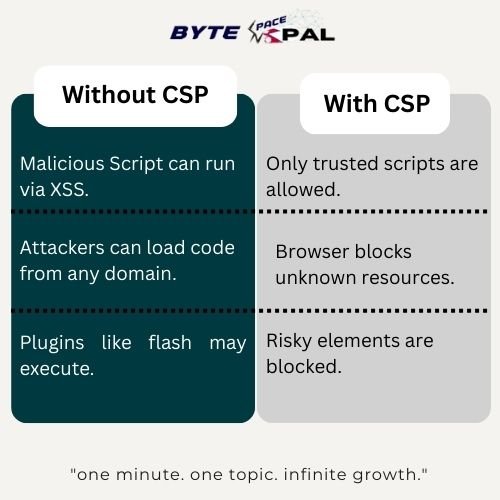
Content Security Policy (CSP) is a security header that tells browsers which content is allowed to run on your website. Think of it as a bouncer for your web page—it decides what scripts, styles, images, and other resources are allowed.
Why CSP Matters?
The Pain points (From My Real Debugging Journey)
1. Everything worked in development…, Locally everything felt perfect.
- Inline Scripts Failed
- CDN resources didn’t load.
- Google Fonts were blocked.
- Third-party widgets silently died.
Reason: Production enforces CSP strictly. Development often doesn’t.
2. Cryptic browser errors
You’ll usually see something like:
Refused to execute inline script because it violates “script-src self”.
Meaning your page tried to run inline code, but you blocked it.
3. Confusion about where CSP should be configured
Should CSP be added in:
- Next.js?
- Spring Boot?
- Nginx?This was the most frustrating part for beginners.
CSP can be set at the server level or the app level, making it easy to misplace.
Fundamental aspects to understand CSP Directives (IMP.)
CSP is a collection of directives – rule that define allowed content sources.
Here are the core ones:
| Directive | What It Controls |
|---|---|
| default-src | Fallback for all resource types |
| script-src | JavaScript execution |
| style-src | CSS and stylesheets |
| img-src | Images |
| font-src | Fonts (Google Fonts, custom fonts) |
| connect-src | APIs, fetch(), WebSockets |
| frame-src | iframes, embeds |
Common Values:
- “self” – same domain
- “none” – block everything
- ‘unsafe-inline’ – allow inline scripts (not recommended)
- ‘unsafe-eval’ – allow eval() (dangerous)
- Specifice URLs – https://bytespacenepal.com/
Implementing CSP in Next.js (Frontend)
Method 1: next.config.ts (Best for most apps)
// next.config.js

const nextConfig = {
  async headers() {
    return [
      {
        source: "/:path*",
        headers: [
          {
            key: "Content-Security-Policy",
            value: [
              "default-src 'self'",
              "script-src 'self' 'unsafe-eval' 'unsafe-inline' https://cdn.example.com",
              "style-src 'self' 'unsafe-inline' https://fonts.googleapis.com",
              "img-src 'self' data: https:",
              "font-src 'self' https://fonts.gstatic.com",
              "connect-src 'self' https://api.example.com",
              "frame-src 'none'",
            ].join("; "),
          },
        ],
      },
    ];
  },
};

module.exports = nextConfig;
import { NextResponse } from 'next/server'

export function middleware() {

  const response = NextResponse.next()
  const csp = [
    "default-src 'self'",
    "script-src 'self' https://cdn.example.com",
    "style-src 'self' 'unsafe-inline'",
    "img-src 'self' data: https:"
  ].join('; ')
  response.headers.set('Content-Security-Policy', csp)
  return response
}
Method 3: Meta tage in _document (Not recommended for Prod)
Especially used for quick testing.
Implementing CSP in Spring Boot (Backend)
Method 1: Spring Security Configuration (Recommended)
.headers(headers -> headers
 .contentSecurityPolicy(csp -> csp.policyDirectives(
 "default-src 'self'; " +
 "script-src 'self' 'unsafe-inline' https://cdn.example.com; " +
 "style-src 'self' 'unsafe-inline' https://fonts.googleapis.com; " +
 "img-src 'self' data: https:; " +
 "connect-src 'self' https://api.bytespacenepal.com; " +
 "frame-src 'none';"
))
)
Other Methods:
WebMvcConfigurer : Good for simpler static policies.
@ControllerAdvice: Useful when building dynamic CSP based on the request.
Common Issues and How to Fix Them.
<script>
alert("This won't run under strict CSP!");
</script>
Solutions:
- Move scripts to external files,
- Use nonces (best balance of security + flexibility)
- Avoid ‘unsafe-inline’ unless you’re testing.
2. Google Fonts or third-party CDNs blocked
Add the domains to your directives:
3. API calls blocked
Testing Your CSP Safely.
1. Start with “Report Only” mode
Doesn’t block anything — just reports violations.
2. Create a reporting endpoint
Log violations. Fix them.
3. Switch to Enforced Mode
Once you’re confident, enforce the policy.
🔐 Other Security Headers You Should Add
-
X-Frame-Options → prevents clickjacking
-
X-Content-Type-Options → prevents MIME sniffing
-
Referrer-Policy → controls referrer info
-
Permissions-Policy → camera/mic/location access
-
Strict-Transport-Security (HSTS) → forces HTTPS
Next.js and Spring Boot both support these out of the box.
Finally,
After three long days of debugging, broken UI, and chaotic logs, I finally fixed my CSP configuration.
The site became stable, fast, and much more secure.
Insights:
CSP isn’t the enemy, It’s the guardian, you just need to teach it what actually want to allow.
Let me know your opinion/ insights on the comment section.
“One Day, One topic, Infinite Growth” 🙂 Byte Space Nepal – Dipesh Ghi
